
Agentic AI: How AI Agents Work · Part 1 of 16
What an AI Agent Is: The Loop, Measured
An agent is a model in a loop that picks tools and decides when it's done. Build one in 160 lines, trace a run, and measure tokens, cost and latency.
On this page
TL;DR
An AI agent is a large language model (LLM) running in a loop: it picks a tool, your code runs it and sends back the result, and the model decides whether to call another tool or stop with an answer. This article builds that loop in about 160 lines of Python on the Claude API, traces one run step by step, and measures 150 runs of Claude Haiku 5.5 on a small docs folder. The agent answered 95% of the questions for under $0.0005 each. A fixed retrieve-then-answer pipeline managed 63%, and pasting the whole folder into the prompt managed 94% for less money. You’ll see what each step costs, why a long run’s cost grows faster than its length, and when you don’t need an agent at all.
Why it matters
Here is a question about a fictional company’s internal docs: “How many engineers are on the team that owns the service listening on port 7001?” A pipeline that searches the docs once and answers from the top three files got it wrong 5 times out of 5. It found the service page, which names the Growth team, but not the Growth team’s page, and replied “The files don’t include a Growth team page, so I can’t determine its headcount.”
The same model, given three tools and a loop, got it right 5 times out of 5. It searched for “7001”, read the service page, looked for the team, read the team page and answered “6”, in five model calls costing $0.00038 together.
Loops also cost more than they look. Models read and write tokens, word pieces of about four characters that APIs bill per million. In one 18-step run below, the model read 47,000 input tokens to answer a question about 12 KB of files, because every step re-sends everything before it. Prompt caching cut that run’s cost by a factor of 3.1.
This is Part 1 of a 16-part series on how agents work, measured on the Claude API. It goes one level below the System Design article Building Tool-Using Agents That Work Reliably and builds on Reasoning Models (Fundamentals Part 14), which explains the thinking tokens agents spend between tool calls.
The intuition
Picture a research assistant in an archive. They can’t walk into the stacks. They write a request slip (“box 7, folder 3”), hand it to a clerk, and get photocopies back. After each delivery they reread their whole notebook, decide what to ask for next, and eventually write up an answer.
That’s the loop. The assistant is the model, the slips are tool calls, the clerk is your code, and the notebook is the conversation history. The assistant decides which box to request and when they know enough. The clerk decides nothing, but can refuse a slip or stop the assistant after too many requests.
The analogy breaks in three places. The model can hand over several slips at once and get them back together. The rereading is literal: the model processes the whole history again on every call, which is where the cost comes from. And the assistant would remember the archive tomorrow, while the model starts every task with an empty notebook.
Step 1: an agent versus a workflow
A tool is a function your code exposes to the model: a name, a plain-language description, and a JSON Schema for its arguments. A tool call is the model’s structured request to run one, which your code executes.
Anthropic’s Building effective agents (Erik Schluntz and Barry Zhang, December 19, 2024) draws the line this series uses. Workflows are “systems where LLMs and tools are orchestrated through predefined code paths”: your code decides the steps, such as retrieve and then answer, or classify and then route. Agents are systems where LLMs “dynamically direct their own processes and tool usage.” In practice they are “typically just LLMs using tools based on environmental feedback in a loop.”
So an agent does three things a workflow doesn’t: it picks the next tool, lets the result change its plan, and decides when it’s done. The post also warns that “agentic systems often trade latency and cost for better task performance.” The System Design article covers when to prefer a workflow in production; Step 5 here measures the trade.
Step 2: the loop in code
What the API gives you
The Claude Messages API is stateless: each request carries the whole conversation. Per the tool use docs, when you pass a tools list the model may reply with stop_reason: "tool_use" and one or more tool_use blocks, each with an id, a tool name and an input object. Your code runs each tool and sends the outputs back as tool_result blocks in the next user message. The loop continues while stop_reason is "tool_use"; any other stop reason (end_turn, max_tokens, refusal) ends it.
Handle tool calls adds the rules that matter in a loop: results go in the very next user message, tool_result blocks come first in it, and when the model asks for several tools at once (a parallel tool call), all their results go back in one message. A failed tool returns its error text with is_error: true, so the model can try something else.
Tools aren’t free even when unused. Passing any tools adds a hidden system prompt of 286 tokens on Haiku 5.5 and Sonnet 5.5, according to the tool use overview, plus the tool definitions themselves, on every call.
Tools as plain functions
In the harness, a tool is a Python function plus a schema, built by a small decorator:
@dataclass
class Tool:
    name: str
    description: str
    params: dict          # JSON Schema "properties"; every parameter is required
    fn: Callable[..., str]

    def schema(self):
        return {
            "name": self.name,
            "description": self.description,
            "strict": True,  # tool inputs are guaranteed to match the schema
            "input_schema": {"type": "object", "properties": self.params,
                             "required": list(self.params), "additionalProperties": False},
        }


def tool(description, **params):
    """Decorator: @tool("what it does", path={"type": "string", ...}) turns a function into a Tool."""
    return lambda fn: Tool(fn.__name__, description, params, fn)


def run_tool(tools, block):
    """Run one tool_use block and return its tool_result block. Errors go back to the model."""
    try:
        out = tools[block.name].fn(**block.input)
        return {"type": "tool_result", "tool_use_id": block.id, "content": str(out)}
    except Exception as e:  # the model sees the error and can try again
        return {"type": "tool_result", "tool_use_id": block.id,
                "content": f"{type(e).__name__}: {e}", "is_error": True}
strict: True turns on strict tool use, which guarantees the model’s arguments match the schema. Part 2 looks at what that does inside the model.
The loop
Here is the heart of harness.py, which every later part imports. It calls the API through ledger.create, a thin wrapper that checks this project’s budget before each call and logs the exact cost after it.
def run_agent(task, tools, system, *, part, model="claude-haiku-5-5", effort="medium",
              max_steps=12, max_cost=0.05, max_tokens=8000, cache=True, parallel=True,
              thinking="omitted", transcript=None, client=None, verbose=True):
    tools = {t.name: t for t in tools}
    request = dict(model=model, max_tokens=max_tokens, tools=[t.schema() for t in tools.values()],
                   system=[{"type": "text", "text": system}], output_config={"effort": effort},
                   thinking={"type": "adaptive", "display": thinking})
    if not parallel:  # at most one tool call per step
        request["tool_choice"] = {"type": "auto", "disable_parallel_tool_use": True}
    if cache:
        request["system"][0]["cache_control"] = {"type": "ephemeral"}  # caches tools + system
        request["cache_control"] = {"type": "ephemeral"}  # moves forward with the conversation
    cl = _TimedClient(client or ledger.client())
    log = Transcript(transcript)
    log.write(event="task", task=task, cache=cache, **request)

    messages = [{"role": "user", "content": task}]
    result = Result(answer="", stop="max_steps")
    for n in range(1, max_steps + 1):
        if result.cost >= max_cost:
            result.stop = "max_cost"
            break
        resp = ledger.create(cl, part, note=f"agent step {n}", messages=messages, **request)
        u, calls = resp.usage, [b for b in resp.content if b.type == "tool_use"]
        step = Step(n, u.input_tokens, u.cache_read_input_tokens or 0,
                    u.cache_creation_input_tokens or 0, u.output_tokens, round(cl.last, 3),
                    ledger.cost_of(model, u), resp.stop_reason,
                    [f"{b.name}({json.dumps(b.input)})" for b in calls])
        result.steps.append(step)
        log.write(event="step", **step.__dict__,
                  content=[b.model_dump(exclude_none=True) for b in resp.content])
        if verbose:
            print(f"step {n:2d}  in {step.input_tokens:5,d}  cache read {step.cache_read:6,d}  "
                  f"write {step.cache_write:5,d}  out {step.output_tokens:4,d}  {step.latency_s:5.2f}s  "
                  f"${step.cost:.5f}  {' '.join(step.tool_calls) or resp.stop_reason}")

        messages.append({"role": "assistant", "content": resp.content})  # keep thinking blocks
        if resp.stop_reason != "tool_use":  # end_turn, max_tokens or refusal: the loop is over
            result.stop = resp.stop_reason
            result.answer = "".join(b.text for b in resp.content if b.type == "text")
            break
        results = [run_tool(tools, b) for b in calls]
        messages.append({"role": "user", "content": results})  # all results in one message
        log.write(event="tool_results", n=n, results=results)

    log.write(event="result", answer=result.answer, stop=result.stop, steps=len(result.steps),
              cost=result.cost)
    return result
Everything that makes this an agent is in the last seven lines of the for loop: append the model’s reply, stop if it didn’t ask for a tool, otherwise run the tools and append their results. The rest is bookkeeping: a step limit and a cost limit (the “stopping conditions” Anthropic’s post recommends), a per-step record of tokens, latency (wall-clock time per call) and cost, and a JSONL transcript with one JSON object per line, which later parts reuse.

Settings, and what these models refuse
A few choices in that code follow from the current models. Defaults come from the effort docs; each refusal was checked with one cheap call:
- Thinking:
thinking: {"type": "adaptive"}lets the model decide whether to reason before each reply, andeffortsteers how much. Haiku 5.5 defaults tomedium, Sonnet 5.5 tohigh; this article usesmediumfor both. Thinking blocks go back unchanged, so the loop appendsresp.contentwhole. - Sampling parameters are rejected. Sending
temperatureto either model returned HTTP 400: “temperature: Extra inputs are not permitted.” - Sonnet 5.5 rejects forced tool calls.
tool_choice: {"type": "any"}returned 400 on Sonnet 5.5, with the messagetool_choice: type "tool" and "any" are not supported for this model.Haiku 5.5 accepted it, at 120 extra input tokens per call (467 instead of 347), as the docs’ table predicts. The harness usesautoand steers the model through the system prompt.
Two cache breakpoints
Prompt caching stores a processed prompt prefix so a later request starting with the same bytes skips recomputing it. Per the prompt caching docs, the prefix runs tools, then system, then messages, and a cache_control marker (a breakpoint) says where it ends. On Haiku 5.5, a cache write costs 1.25 times the normal input price and a read 0.1 times; prefixes under 512 tokens aren’t cached, and entries live 5 minutes, refreshed on each read.
The harness sets two breakpoints. One on the system prompt caches the tool definitions and system prompt, which never change. The request-level cache_control places a second one on “the last cacheable block and moves it forward as conversations grow.” Each step then reads the previous step’s conversation from the cache and pays the write price only on what’s new.
Step 3: one run, traced
The sandbox
The test bed is a docs folder for a fictional company, Larkspur Robotics: 23 files, about 12 KB, roughly 6,700 tokens. It holds service, team, runbook and policy pages, a changelog, and two CSV (comma-separated values) files: a 40-row incident log and a 65-row on-call roster. The script that generated the folder also computed every answer, so grading is exact.
The agent gets three read-only tools: list_files, read_file and search. Here is search in full; the other two follow the same pattern.
@tool("Search every file in the docs sandbox for a case-insensitive text or regular expression. "
      "Returns up to 30 matching lines as 'path:line_number: text'. Use it to find which file "
      "mentions a service, person, number or term; then read_file for full context.",
      pattern={"type": "string", "description": "Text or Python regular expression, e.g. 'port 7001' or 'depends on:.*billing'"})
def search(pattern):
    rx = re.compile(pattern, re.IGNORECASE)
    hits = []
    for f in sorted(ROOT.rglob("*")):
        if f.is_file():
            for i, line in enumerate(f.read_text().splitlines(), 1):
                if rx.search(line):
                    hits.append(f"{f.relative_to(ROOT)}:{i}: {line.strip()}")
    return "\n".join(hits[:30]) or "no matches"
The system prompt (135 words) says to use the tools rather than guess and to end with a line ANSWER: <the answer>. Grading reads only that line.
Five calls to answer one question
Here is the port-7001 question from the opening, run once on claude-haiku-5-5 with effort medium and thinking summaries switched on:
result = run_agent(t["question"], TOOLS, SYSTEM, part="a01", thinking="summarized",
transcript=f"runs/demo-{t['id']}-summarized.jsonl")| Step | Model’s action | What came back | Input tokens (read from cache / written) | Output tokens | Latency | Cost |
|---|---|---|---|---|---|---|
| 1 | search("7001") | 1 line: notification-hub.md:7: - Listens on port 7001 | 1,086 (988 / 94) | 48 | 1.89 s | $0.00005 |
| 2 | read_file("docs/services/notification-hub.md") | the page: “Owner team: Growth” | 1,163 (1,082 / 79) | 58 | 1.26 s | $0.00005 |
| 3 | search("Growth") | 16 lines, mostly on-call roster rows | 1,347 (1,161 / 184) | 49 | 1.16 s | $0.00006 |
| 4 | read_file("docs/teams/growth.md") | “Headcount: 6 engineers” and six names | 2,025 (1,345 / 678) | 56 | 1.39 s | $0.00013 |
| 5 | answers: ANSWER: 6 | 2,232 (2,023 / 207) | 95 | 1.67 s | $0.00009 |
Five model calls, 7.4 seconds of model time, $0.00038, and 7,853 input tokens read to answer from two short files. Step 1 found 988 tokens of tool definitions and system prompt already cached by earlier runs.
Steps 1 to 4 contain no thinking at all. Only before its final answer did the model write a one-line thought: “The headcount of 6 matches the member list of 6 names, so the answer is confirmed as 6.” The effort docs note that in a tool-use loop, “follow-up requests that only process tool results can still skip thinking at any level.” Across the 150 runs below, 34.5% of tool-calling steps and 49% of final steps included a thinking block.
Step 3 was a detour. Searching “Growth” returned 16 lines, 13 of them on-call roster rows, and all 16 rode along in every later request: the 678-token jump at step 4. Still, each choice followed from the last result. The model opened docs/teams/growth.md because it had read “Owner team: Growth”, the “ground truth” from the environment that Anthropic’s post says agents need at each step.
Step 4: the loop, measured
Setup
All results in this section use claude-haiku-5-5, adaptive thinking at effort medium, both cache breakpoints, a 12-step limit and a $0.05 cost limit per run. No run hit a limit; every run ended with end_turn. The 30 questions come in four kinds: 8 lookup (one fact in one file), 8 multi-hop (a chain such as service, owner team, team lead), 8 aggregate (a count, sum or maximum over a CSV file) and 6 long (a chain plus aggregation, such as total minutes down for services whose team has more than five engineers).
Each question ran 5 times: 150 runs. Rates are the share of runs answered correctly, with a 95% Wilson confidence interval: a range built so that, over many repeated experiments, 95% of such ranges contain the true rate. Because questions repeat, resampling whole questions gives wider intervals; for the agent’s overall rate, 87% to 100%.
Accuracy, steps and cost
| Kind | Correct | Mean steps | Cost per task | Model time per task |
|---|---|---|---|---|
| lookup | 40/40 (100%, 91-100) | 2.8 | $0.00020 | 4.3 s |
| multi-hop | 40/40 (100%, 91-100) | 3.9 | $0.00037 | 6.6 s |
| aggregate | 40/40 (100%, 91-100) | 3.3 | $0.00049 | 5.6 s |
| long | 23/30 (77%, 59-88) | 4.4 | $0.00087 | 8.5 s |
| all | 143/150 (95.3%, 90.7-97.7) | 3.5 | $0.00046 | 6.1 s |
The agent answered every lookup, multi-hop and aggregate question in all five runs. All seven misses were on two long questions, and neither is about the loop. “Which team owns the services with the most SEV1 and SEV2 incidents combined?” (the two most severe incident levels) failed 5 of 5: the model counted per service, found auth-gateway with 6 and answered its owner, Identity, while per team, Payments has 7. The question allows both readings, and Haiku picked the same one every time. “Which service has the fewest incidents, and who leads its team?” failed 2 of 5 on format: the explanation named search-indexer, but the ANSWER: line gave only “Grace Okafor”.
A run took 2 to 6 steps (mean 3.5) and 4.3 tool calls; the busiest made 13. In 57% of tool-calling steps (215 of 380) the model asked for several tools at once. A run cost $0.00046 on average, 46 cents per thousand questions.
What a step costs
| Step | Runs reaching it | Input tokens | Read from cache | Written to cache | Output tokens | Latency |
|---|---|---|---|---|---|---|
| 1 | 150 | 1,090 | 1,067 | 19 | 99 | 1.58 s |
| 2 | 150 | 1,557 | 1,311 | 244 | 110 | 1.63 s |
| 3 | 141 | 2,502 | 1,792 | 708 | 170 | 1.86 s |
| 4 | 59 | 3,256 | 2,643 | 611 | 177 | 1.93 s |
| 5 | 27 | 3,859 | 3,205 | 652 | 162 | 1.85 s |
| 6 | 3 | 5,755 | 4,803 | 950 | 137 | 1.66 s |
Input grows every step, because each request carries every earlier tool result. Output stays small: the median step wrote 105 tokens, thinking included. Latency barely moves, 1.72 s per step on average and 2.33 s at the 90th percentile, because at these sizes the round trip and the tokens written dominate.
Of all input tokens across the 150 runs, 81.5% were cache reads. Even so, output was 51% of the cost, because Haiku 5.5’s output price ($0.50 per million tokens) is 50 times its cache-read price ($0.01).
Why long runs cost more than they look
Write the context at step n as a starting size plus a fixed growth per step:
context(n) ≈ C0 + Δ·(n − 1)
total input over N steps ≈ N·C0 + Δ·N·(N − 1)/2
Here C0 is the first request (tools, system prompt and task) and Δ is the average tool result plus the model’s reply. The second term grows with the square of the step count: double the steps and, once results dominate, input roughly quadruples.
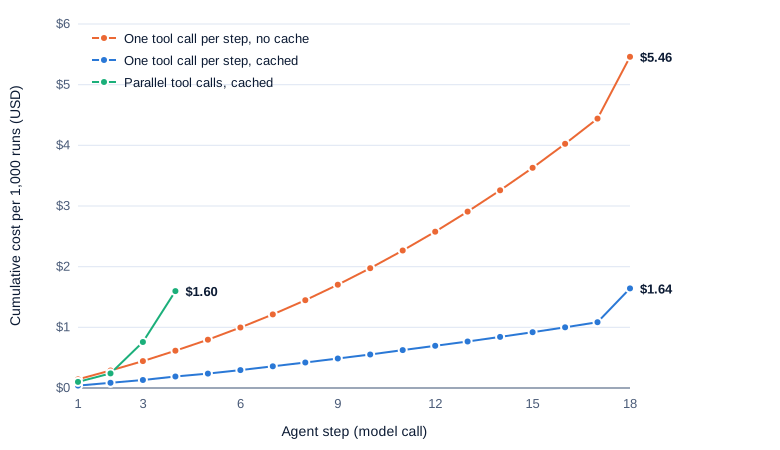
The questions above are too short to show this, so one more task is an audit: open every service page, team page and the incident log, build a table, and name the team lead responsible for the most incidents. It ran with parallel=False, which sets disable_parallel_tool_use so the model makes one tool call per step, and in the default mode, with and without caching. All 16 runs were correct.
| Mode | Steps | Input tokens per run | Model time | Cost, cached | Cost, no cache |
|---|---|---|---|---|---|
| One tool call per step | 18.3 | 47,150 | 36.1 s | $0.00177 | $0.00546 |
| Parallel tool calls | 4.2 | 13,342 | 13.2 s | $0.00170 | $0.00225 |
In the one-call-per-step runs, the context grew from 1,146 tokens to 3,906 by step 17, about 172 tokens per step, then jumped to 5,327 after the incident log was read. With C0 = 1,146 and Δ = 172, the formula predicts about 47,000 input tokens over 18 steps; the runs averaged 47,150.
Swipe to pan the diagram, or tap it to zoom.
Without caching, every step pays full price for the whole history, so the curve bends upward. With caching, each step pays a tenth of the price for the history, so the line stays nearly straight until the final, output-heavy step.
Caching on and off
To measure caching directly, 18 of the 30 questions also ran with caching off (3 runs each, 54 runs), against the same questions with caching on (5 runs each, 90 runs).
| Caching | Runs | Correct | Input tokens per run | Cost per run | Model time per run |
|---|---|---|---|---|---|
| on | 90 | 83 (92%) | 7,472 | $0.00051 | 6.4 s |
| off | 54 | 49 (91%) | 7,718 | $0.00105 | 6.3 s |
Caching halved the cost and changed little else. Part of the saving came from other runs, which had already cached the first 1,000 or so tokens (tools, system prompt, often the question), as many users would in a product. Repriced as if each started with an empty cache, the 150 main runs would cost $0.00064 each, against $0.00046 measured and $0.00094 with no caching.
Step 5: workflow versus agent
Two workflows on the same questions
Two simpler designs ran on the same 30 questions, 5 times each, with the same model and settings:
- Retrieve, then answer: code scores every file against the question with TF-IDF (term frequency times inverse document frequency, a classic keyword-relevance score), puts the top 3 files in the prompt and makes one call. It’s a basic RAG (retrieval-augmented generation) pipeline: the code decides what the model sees.
- Paste everything: all 23 files (about 6,700 tokens) go into a cached system prompt, and the model answers in one call.
| Design | Lookup | Multi-hop | Aggregate | Long | All (95% CI) | Calls per task | Cost per task | Model time per task |
|---|---|---|---|---|---|---|---|---|
| Retrieve top 3, then answer | 40/40 | 24/40 | 25/40 | 5/30 | 62.7% (54.7-70.0) | 1 | $0.00032 | 2.0 s |
| Paste the whole folder | 40/40 | 39/40 | 40/40 | 22/30 | 94.0% (89.0-96.8) | 1 | $0.00026 | 2.0 s |
| Agent loop | 40/40 | 40/40 | 40/40 | 23/30 | 95.3% (90.7-97.7) | 3.5 | $0.00046 | 6.1 s |
Retrieval worked whenever the question’s words pointed at the right file, and failed when the answer sat one hop away. On the port-7001 question it retrieved the service page, the README and the Data team’s page, and answered “unknown” five times. The loop fixes that case: it reads “Owner team: Growth” and fetches the page retrieval never scored. On multi-hop and aggregate questions the loop raised accuracy from 61% to 100%, for 1.4 times the cost and 3 times the latency.
Pasting everything did as well as the agent for 43% less, because the whole folder fits in a cached prompt. Its misses were the same ambiguous question, three format slips and one multi-hop error.
When the loop earns its cost
The folder is tiny on purpose, so every trace fits on a page. Grow it and the comparison flips. Pasting pays for the whole corpus on every question, and Haiku 5.5 charges long-prompt prices on any request over 100,000 tokens ($0.05 per million for cache reads). A cached 300,000-token prompt would cost about $0.015 per question just to read, 30 times this agent’s average run, and a 1-million-token corpus wouldn’t fit at all. The agent’s cost depends on what it opens, whatever the size of the folder.
If the facts fit comfortably in one prompt, paste them. If one keyword search finds the right document, retrieve and answer. Use a loop when the next thing to read depends on what the last thing said, or when the task needs actions, not just reading.
A stronger model on the hard questions
The six long questions also ran 3 times each on claude-sonnet-5-5, at the same medium effort:
| Model | Correct | Mean steps | Input tokens per run | Output tokens per run | Cost per run | Model time |
|---|---|---|---|---|---|---|
| claude-haiku-5-5 | 23/30 (77%, 59-88) | 4.4 | 11,450 | 902 | $0.00087 | 8.5 s |
| claude-sonnet-5-5 | 16/18 (89%, 67-97) | 3.9 | 8,973 | 566 | $0.0103 | 7.8 s |
Sonnet 5.5 read the ambiguous incident question per team and got it right 3 of 3 times, but made the same answer-line slip twice. It took fewer steps and wrote fewer tokens, yet cost 11.8 times as much, because its input and output prices are 20 times Haiku’s (pricing). With 18 runs the intervals overlap, and the whole difference comes from how each model read one question.
All the experiments in this article cost $0.45 on the ledger. Sonnet was 44% of it.
In the real world
- Anthropic’s coding agent, Claude Code, describes its agentic loop as three phases, “gather context, take action, and verify results,” repeated until the task is done. Its tools fall into file operations, search, execution, web and code intelligence, and the docs call the layer that supplies the tools and manages the context an “agentic harness.” Their example of fixing failing tests (run the tests, read the errors, search and read source files, edit, rerun) is the loop above with more tools.
- Anthropic’s multi-agent research system (June 13, 2025) reports that agents “typically use about 4× more tokens than chat interactions,” and multi-agent systems about 15 times more. On the BrowseComp browsing benchmark, “token usage by itself explains 80% of the variance” in performance. An Opus 4 lead agent with Sonnet 4 subagents outperformed a single Opus 4 agent by 90.2% on their internal research evaluation. Part 7 measures that trade.
- Claude Code clears older tool outputs and then summarizes the conversation as its context window (the most tokens one request can hold) fills up, the long-run answer to the growth measured in Step 4. Part 5 covers those techniques.
The rest of the series builds on this harness:
| Part | Topic |
|---|---|
| 1 | What an agent is: the loop, measured (this article) |
| 2 | How tool calling works inside the model |
| 3 | Reasoning and acting: ReAct, planning and thinking |
| 4 | Reflection and self-correction |
| 5 | Context engineering |
| 6 | MCP: connecting agents to tools |
| 7 | Multi-agent systems and agent-to-agent protocols |
| 8 | Coding agents |
| 9 | Computer-use and browser agents |
| 10 | Research agents: search, read, cite |
| 11 | Evaluating agents |
| 12 | Long-horizon reliability |
| 13 | Sandboxing and permissions |
| 14 | Training models to be agents |
| 15 | Cost and latency of agents |
| 16 | An agent end to end |
Common misconceptions
- “An agent is a special kind of model.” The same Haiku 5.5 answered the one-call workflows. What makes it an agent is the loop: tool definitions, a stop-reason check, and code that runs tools and appends results.
- “The model runs the tools.” It never does. It emits a
tool_useblock with a name and arguments; your code decides whether and how to run it. That’s why the guardrails in the System Design article live in code. - “Every step costs about the same.” The API is stateless, so each request carries the whole history: input grows every step, and total input grows roughly with the square of the step count. In the 18-step audit, step 17 read 3.4 times as many tokens as step 1.
- “An agent is always the better design.” On this folder, pasting all 23 files into the prompt matched the agent’s accuracy for 43% less cost and a third of the latency. The loop paid off only against retrieval that missed the second hop.
- “A wrong answer means the model can’t reason.” All seven of Haiku’s misses came from one ambiguous question and one answer-format slip. Here, task wording moved the score as much as switching to Sonnet did; Part 11 returns to this.
Key takeaways
- An agent is a model in a loop. It picks a tool, your code runs it, the result goes back, and the model decides whether to continue or answer.
- The loop is short. The harness here is about 160 lines, and the agentic part is seven of them; the rest is limits, logging and cost accounting.
- Every step re-sends the whole history. Input grows each step and total input grows with the square of the number of steps, which made an 18-step run read 47,000 tokens.
- Prompt caching is the first fix. It halved cost across 144 matched runs and cut the 18-step run’s cost by a factor of 3.1, with no change in accuracy.
- Use the simplest design that works. Paste small corpora, retrieve when one search finds the answer, and loop when the next step depends on the last result.
What’s next
The loop treats a tool call as a black box: the model emits a tool_use block and your code runs it. Part 2 opens that box. How do tool schemas reach the model, how does it decide to call one, what does strict mode change, and how often do calls come out malformed with it on and off?
Further reading
- Building effective agents (Erik Schluntz and Barry Zhang, Anthropic, 2024): the workflow and agent definitions, the five workflow patterns, and why to start simple.
- How tool use works (Claude API docs): the tool-use contract and the client-side agentic loop.
- Handle tool calls (Claude API docs): formatting
tool_resultblocks, parallel results andis_error. - Define tools (Claude API docs): writing tool descriptions,
tool_choice, and which models accept forced tool use. - Prompt caching (Claude API docs): prefix order, breakpoints, automatic caching, prices and minimum lengths.
- Pricing (Claude API docs): per-model input, output and cache prices, including Haiku 5.5’s long-prompt rates.
- How Claude Code works (Claude Code docs): a production agentic loop, its tools and its context management.
- How we built our multi-agent research system (Anthropic, 2025): token use of agents and multi-agent systems, measured.
- ReAct (Yao et al., 2022): the paper behind the reason-act-observe loop, which Part 3 takes apart.