
Agentic AI: How AI Agents Work · Part 2 of 16
How Tool Calling Works Inside the Model
Tool schemas become prompt tokens, and a tool call is a predicted token. Strict mode, parallel calls and tool descriptions, measured on Claude Haiku 5.5.
On this page
TL;DR
Your tool definitions are pasted into the model’s prompt as text, and a tool call is a sequence of tokens the model predicts, which the API parses into a tool_use block; on the Claude API, 20 tools add 3,251 input tokens to every request. On an open model you can read that prompt and watch the probability of the <tool_call> token go from about one in 50 billion for “Write a haiku” to 98% for “What’s the weather in Paris?”. On tricky schemas, Claude Haiku 5.5 made schema-invalid calls 5.8% of the time with strict mode off, and none among calls that finished normally with it on. Strict mode also sent 28 calls to the token limit on one schema pattern and silently bent values to fit. Parallel calls cut latency by 42% on independent lookups, and better descriptions raised tool-selection accuracy from 88% to 100%.
Why it matters
Ask Claude for the weather in Paris with a get_weather tool attached and you get back {"name": "get_weather", "input": {"city": "Paris"}}. It looks like a function call, but it is text, predicted one token at a time by the same machinery that writes a haiku.
The tool list is part of the prompt, so it costs tokens on every call: 449 tokens for one small tool on Haiku 5.5. The call is a prediction, so its JSON can be wrong: 13 of 223 calls broke the schema in one experiment below. And the decision to call a tool at all is a probability, which a well-written description can move.
Part 1 built the agent loop and treated each tool call as a black box; this part opens it. It builds on Guaranteeing Valid JSON Output from LLMs (System Design 13), which explains constrained decoding in detail, and Building Tool-Using Agents That Work Reliably (System Design 10), which covers the guardrails around the loop.
The intuition
Think of a restaurant where the chef can’t leave the kitchen. The waiter hands over a laminated card listing what the pantry runner can fetch, and how to ask: “write FETCH, then the item, on a slip.” When an ingredient is missing, the chef writes a slip in that format, the runner fetches it, and the chef carries on cooking.
The card is the tool definitions in the prompt. The slip is the tool call. The runner is your code. Strict mode is a slip with printed boxes: the chef can only write a valid item code in each box. Parallel calls are three slips handed over at once instead of one per trip.
The analogy breaks in one place. A chef decides to write a slip, then writes it, but a language model has no separate decision step. “Write a slip” and “start the answer” compete as possible next tokens, and whichever is sampled wins.
Step 1: what the model actually sees
A language model reads one flat sequence of tokens (word pieces; see Tokenization). Tools, roles and messages all have to be flattened into it. The recipe for that is the model’s chat template: a small program, shipped with the model, that lays out a conversation with special tokens marking who is speaking.
An open model’s template
Open models publish their template, so you can read it. Here is Qwen3-0.6B’s template (from its tokenizer_config.json on Hugging Face) rendering one tool and one question:
from transformers import AutoTokenizer

tok = AutoTokenizer.from_pretrained("Qwen/Qwen3-0.6B")
weather = {"type": "function", "function": {
    "name": "get_weather", "description": "Get the current weather for a city.",
    "parameters": {"type": "object", "properties": {"city": {"type": "string"}}, "required": ["city"]}}}
messages = [{"role": "user", "content": "What's the weather in Paris?"}]

prompt = tok.apply_chat_template(messages, tools=[weather], add_generation_prompt=True,
                                 tokenize=False, enable_thinking=False)
print(prompt)
<|im_start|>system
# Tools
You may call one or more functions to assist with the user query.
You are provided with function signatures within <tools></tools> XML tags:
<tools>
{"type": "function", "function": {"name": "get_weather", "description": "Get the current weather for a city.", "parameters": {"type": "object", "properties": {"city": {"type": "string"}}, "required": ["city"]}}}
</tools>
For each function call, return a json object with function name and arguments within <tool_call></tool_call> XML tags:
<tool_call>
{"name": <function-name>, "arguments": <args-json-object>}
</tool_call><|im_end|>
<|im_start|>user
What's the weather in Paris?<|im_end|>
<|im_start|>assistant
<think>
</think>
The tool’s JSON Schema (the standard format for describing JSON data: field names, types, which fields are required) is dumped into the system message, followed by an instruction showing the call format. Qwen2.5’s template contains the same tool block. With two tools, the rendered prompt is 219 tokens against 19 without tools.
<tool_call> is a single token in the vocabulary (ID 151657 in both Qwen2.5 and Qwen3), and so is </tool_call>. Results come back wrapped in <tool_response> tags inside a user turn. Other model families pick other markers. Llama 3.1’s prompt format uses <|python_tag|>, “a special tag used in the model’s response to signify a tool call,” ends a tool-calling message with <|eom_id|> instead of the usual end-of-turn token, and returns results in a role called ipython.
The Claude API’s version
Claude’s raw template isn’t public, but Anthropic’s Define tools page shows its outline. When you pass tools, “the API constructs a special system prompt from the tool definitions, tool configuration, and any user-specified system prompt”:
In this environment you have access to a set of tools you can use to answer the user's question.
{{ FORMATTING INSTRUCTIONS }}
String and scalar parameters should be specified as is, while lists and objects should use JSON format. Note that spaces for string values are not stripped. The output is not expected to be valid XML and is parsed with regular expressions.
Here are the functions available in JSONSchema format:
{{ TOOL DEFINITIONS IN JSON SCHEMA }}
{{ USER SYSTEM PROMPT }}
{{ TOOL CONFIGURATION }}
The line about regular expressions suggests the model writes calls in a text format of its own, which the API parses into a tool_use content block before you see it. Here is a real one from Haiku 5.5, without two bookkeeping fields (caller and toolset_name):
{"type": "tool_use", "id": "toolu_016D9BRyBn61QaysA77tT3uS", "name": "get_weather", "input": {"city": "Paris"}}Your code answers with a tool_result block carrying the same id, as Part 1 showed.
What the tools cost
Because definitions are prompt text, they’re billed as input tokens on every request. Anthropic’s token counting endpoint is free, so the cost can be measured exactly. This counts a one-line question with 0 to 20 realistic tools (2 to 4 parameters each, a two- or three-sentence description):
import ledger                      # Part 1's budget wrapper; client() returns an anthropic.Anthropic
from toollib import TOOLS          # 20 tool definitions, 2-4 parameters each

cl = ledger.client()
msg = [{"role": "user", "content": "What's the weather in Paris?"}]
for n in (0, 1, 5, 20):
    extra = {"tools": TOOLS[:n]} if n else {}
print(n, cl.messages.count_tokens(model="claude-haiku-5-5", messages=msg, **extra).input_tokens)| Tools attached | Input tokens (Haiku 5.5 and Sonnet 5.5) | Added by tools |
|---|---|---|
| 0 | 18 | 0 |
1 (a minimal tool: name t, empty schema) | 332 | 314 |
1 (get_weather) | 467 | 449 |
| 5 | 1,042 | 1,024 |
| 10 | 1,946 | 1,928 |
| 20 | 3,269 | 3,251 |
The first tool brings a fixed preamble: the docs’ pricing table lists a tool-use system prompt of 286 tokens for both models, and the empty tool adds the rest of the 314. After that each tool adds about 147 tokens, which is about what its JSON costs as plain text: the same 20 definitions pasted into a user message counted 2,874 tokens.
tool_choice: none counted the same as auto (467). Forcing a tool on Haiku 5.5 added 120 tokens (587), matching the docs’ 406-token system prompt for forced calls. strict: true added nothing.
At Sonnet 5.5’s $2 per million input tokens, the 3,251 tokens of 20 tools cost $0.0065 per request, or $0.13 across a 20-step agent run. Prompt caching (see Prefix Caching) cuts that by 95% on cache reads, because the tool block sits at the very front of the prompt and never changes.
Step 2: how the model decides to call a tool
It’s next-token prediction
A model generates text by scoring every token in its vocabulary, picking one, appending it and repeating (the decode loop in How LLM Inference Works). After the assistant header, <tool_call> is just one of about 152,000 candidates. If it wins, the model is writing a call; if “The” wins, it’s writing prose.
You can read that probability directly on an open model. This runs Qwen3-0.6B on a CPU:
import torch
from transformers import AutoTokenizer, AutoModelForCausalLM

tok = AutoTokenizer.from_pretrained("Qwen/Qwen3-0.6B")
model = AutoModelForCausalLM.from_pretrained("Qwen/Qwen3-0.6B", dtype=torch.bfloat16)
weather = {"type": "function", "function": {
    "name": "get_weather", "description": "Get the current weather for a city.",
    "parameters": {"type": "object", "properties": {"city": {"type": "string"}}, "required": ["city"]}}}
TOOL_CALL = tok.convert_tokens_to_ids("<tool_call>")  # one token, id 151657

@torch.no_grad()
def p_tool_call(question):
    prompt = tok.apply_chat_template([{"role": "user", "content": question}], tools=[weather],
                                     add_generation_prompt=True, tokenize=False, enable_thinking=False)
    ids = tok(prompt, return_tensors="pt").input_ids
    probs = model(ids).logits[0, -1].float().softmax(-1)  # distribution over the next token
    return probs[TOOL_CALL].item()

for q in ["What's the weather in Paris?", "Should I bring an umbrella in London today?", "Write a haiku about autumn."]:
    print(f"{p_tool_call(q):.2e}  {q}")
9.84e-01 What's the weather in Paris?
8.08e-09 Should I bring an umbrella in London today?
1.92e-11 Write a haiku about autumn.The logits are the model’s raw scores for each token, and softmax turns them into probabilities that sum to 1 (see Embeddings and Logits). Running the same probe with a weather tool and a stock-price tool over 20 questions gave:
| Question type | Questions | Mean P(<tool_call> first) | Questions with P > 0.5 |
|---|---|---|---|
| Needs a tool (“Price of MSFT?”, “How cold is it in Oslo?”) | 10 | 0.61 | 6 |
| Needs no tool (“Who wrote Pride and Prejudice?”) | 10 | 0.00000007 | 0 |
The tiny model never reached for a tool when none was needed (the highest probability was 7 × 10⁻⁷, for “What is 17 times 23?”). It reliably called on direct requests like “Price of MSFT?” (0.996) and missed the four that never said “weather” or “price”: “How hot is it in Cairo today?” (0.15), “Is it raining in Tokyo right now?” (0.14), “How cold is it in Oslo?” (1 × 10⁻⁶) and the umbrella question (4 × 10⁻⁸; its most likely first token was “I”). A miss and a hit come from the same place, a probability on one side of the line or the other.
Picking which tool is the same process a few tokens later. With the prompt extended by <tool_call> and {"name": "get, the next token splits between _weather and _stock. For “What’s AAPL trading at?” the model put 0.999995 on _stock. For “Is it a good day for a picnic in Rome?” it put 0.9999 on _weather. Greedy decoding (always taking the top token) of the Paris prompt produced exactly 20 tokens: <tool_call>\n{"name": "get_weather", "arguments": {"city": "Paris"}}\n</tool_call><|im_end|>.
Where the behavior comes from
Nothing in the architecture knows about tools; the behavior is learned. Models are fine-tuned on conversations laid out with their chat template, tool calls included, so predicting a well-formed <tool_call> after a weather question is learned the way answering questions is learned (see From Base Model to Assistant). Toolformer (Schick et al., 2023) showed an early version of this: a model “trained to decide which APIs to call, when to call them, what arguments to pass, and how to best incorporate the results into future token prediction.”
Training also explains why some schemas work better than others: Anthropic’s How tool use works says its bash, text editor, memory, computer and browser tools have “trained-in” schemas: “Claude has been optimized on thousands of successful trajectories that use these exact tool signatures, so it calls them more reliably.” Your custom tools only get the description you write.
Making the format impossible to break
A prediction can be wrong, including its JSON. The fix is constrained decoding: compile the JSON Schema into a grammar and, at each step, set the probability of every token that would break it to zero. The strict tool use docs call it “grammar-constrained sampling”: with "strict": true on a tool, “the input field in the tool_use block strictly follows your input_schema, and the name is always valid.” System Design 13 explains how the grammar is built; Step 3 measures what it changes.
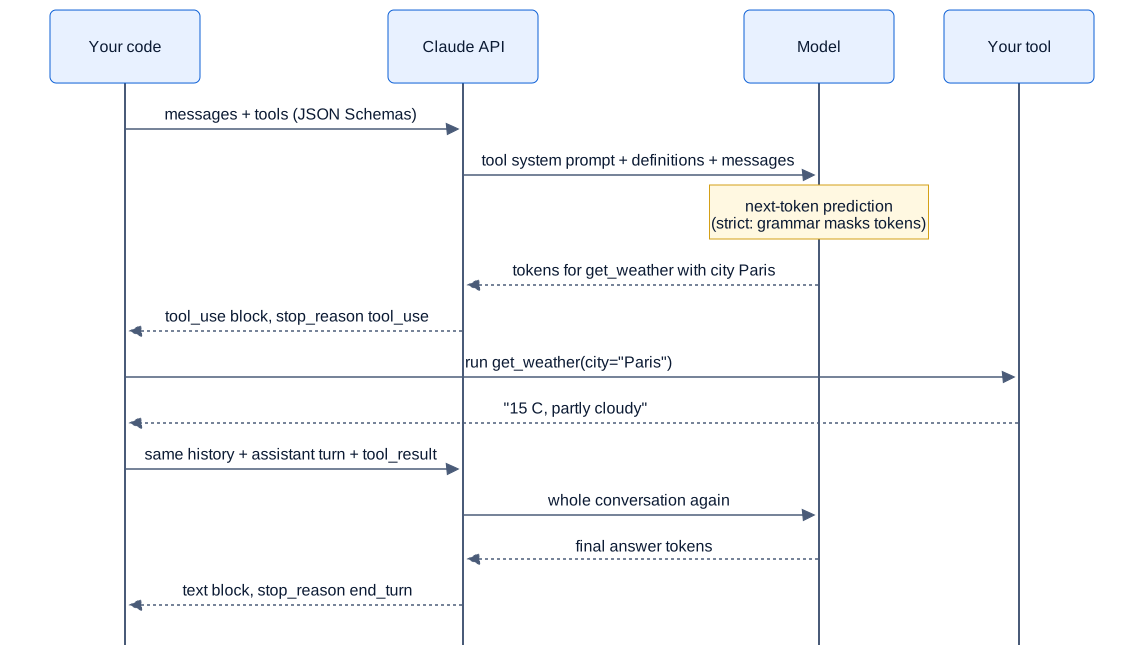
Swipe to pan the diagram, or tap it to zoom.
Step 3: strict mode, measured
The setup
Three tools have schemas built to trip a model up. book_trip has a nested traveler object, an array of flight legs, airport codes limited to three capital letters, and seven optional fields. file_bug has enums like "Billing API" and "P1", a customer ID pattern (CUS- plus six digits) and a required field that may be null. In schedule_report, minute must be 0, 15, 30 or 45. Ranges such as “passengers, 1 to 9” live only in the descriptions, because strict mode doesn’t support minimum and maximum (JSON Schema limitations).
The 48 requests lean on known weak spots: “a dozen seats”, “biz class”, “next Friday”, “8:10 in the morning”, “Severity 10/10”, a customer ID missing its prefix. The system prompt says to call exactly one tool without asking follow-up questions. Each request ran 5 times with strict off and 5 times with it on, in random order, on claude-haiku-5-5 at its default effort (medium) with adaptive thinking on (Haiku 5.5’s default), all three tools attached. The 480 calls were checked with the jsonschema library:
from jsonschema import Draft202012Validator, FormatChecker
from exp3_schemas import SCHEDULE_REPORT

# A real call from the strict-off run: "Daily signups every weekday at 8:10 in the morning UTC"
call = {"report": "daily_signups", "days": ["mon", "tue", "wed", "thu", "fri"], "hour": 8, "minute": 10,
        "format": "csv", "recipients": ["growth@acme.io"], "filters": {"region": "EMEA"}}
v = Draft202012Validator(SCHEDULE_REPORT["input_schema"], format_checker=FormatChecker())
print([e.message for e in v.iter_errors(call)])
['10 is not one of [0, 15, 30, 45]']The results
The intervals are 95% Wilson score intervals, a standard confidence interval for a proportion that stays sensible near 0% and 100%.
| Metric | Strict off | Strict on |
|---|---|---|
| Responses | 240 | 240 |
| Responses with no tool call (model declined) | 17 | 18 |
| Tool calls | 223 | 231 |
| Schema-invalid calls, all | 13 (5.8%, CI 3.4-9.7%) | 28 (12.1%, CI 8.5-17.0%) |
| Invalid calls among responses that ended normally | 13 of 223 | 0 of 203 (CI 0-1.9%) |
Responses cut off at max_tokens | 0 | 28 |
| Mean latency, excluding cut-off responses | 2.87 ± 0.14 s | 3.47 ± 0.18 s |
| Mean input tokens | 2,290 | 2,290 |
| Cost | $0.111 | $0.166 |
With strict off, all 13 invalid calls had the same cause: the model wrote the minute the user asked for, 10, 20 or 59, instead of a value from [0, 15, 30, 45]. Everything else held, across nested objects, patterns, dates and enums.
With strict on, every call that finished normally was valid. The 28 failures all came from one field, written as {"type": ["string", "null"], "format": "email"}. When the bug had no assignee, the strict model never wrote null. In 28 responses it generated until it hit the 4,096-token limit, and the API returned an input cut off before the field. In 7 more it invented an address, like "null-placeholder-not-used@example.com", which is valid by the schema and wrong in every other way. The strict-off model wrote null all 35 times.
A follow-up isolated the cause: 30 calls with a two-field tool, 5 per variant and setting. With strict on, the "format": "email" version hit the limit 5 times out of 5. Without the format line, or written as anyOf an email string or null, strict mode wrote null 5 times out of 5. The docs warn that a response stopped by max_tokens “might be incomplete and not match your schema,” so these failures sit outside the guarantee. A strict schema guarantees whatever its compiled grammar allows, which may not be what you meant.
Strict mode also changed meaning without saying so. Asked for 8:10, it chose minute 15 four times and 0 once. Asked for 23:59, it chose 45. The grammar left no way to write the true value, so the model picked an allowed one. With strict off, the same requests failed with a schema error your code could catch.
Range checks fell to the model’s own judgment. It declined to call the tool in 10 of 20 runs for “a dozen seats” and “ten people”, citing the 1-to-9 range from the description, in 10 of 10 for “the first and fifteenth of each month”, which the schema can’t express, and in 10 of 10 for a flight to Paris with no departure city. Only two calls broke a description-only range: passengers=12 (strict off) and passengers=10 (strict on).
What strict costs
Strict mode added no input tokens, but it added time. The first request with a new schema has to compile the grammar. With a random enum value making the schema new each time, over 6 trials, the first strict call took 7.15 ± 0.50 s and the next two took 3.40 and 3.08 s. The same pattern without strict took 2.71, 3.33 and 2.93 s. That’s about 4 seconds of compilation for this three-tool set. Compiled grammars are cached for 24 hours from last use.
After compilation, strict calls in the main run were still slower: 3.49 s against 2.98 s on the same 41 prompts, with similar output tokens (506 against 486). The cost gap is almost all the 28 runaway responses, about 3,900 output tokens each.
Step 4: parallel calls, measured
The model may put several tool_use blocks in one response. The parallel tool use docs say “Claude 4 and later models make parallel tool calls by default when a request benefits from multiple tools,” and that setting disable_parallel_tool_use: true inside tool_choice limits the model to at most one call per response.
The task set has 20 tasks over six mock tools (weather, stock price, currency conversion, order lookup, inventory, shipping quotes) that return instant, deterministic results. Fourteen need 2 to 4 independent lookups (“Give me the current prices of AAPL, MSFT and NVDA”), four are dependent chains (“What’s NVDA’s price in euros?” needs the price first), and two mix both. Each task ran 5 times with parallel calls allowed and 5 times disabled, on Haiku 5.5 at default effort, through a minimal loop: 200 runs.
| Task type | Setting | Model calls per task | Latency per task | Input tokens per task | Cost per task |
|---|---|---|---|---|---|
| Independent (70 runs) | parallel allowed | 2.00 | 3.28 ± 0.17 s | 2,792 | $0.00042 |
| Independent (70 runs) | parallel disabled | 3.79 ± 0.13 | 5.67 ± 0.32 s | 5,200 | $0.00067 |
| Dependent (20 runs) | parallel allowed | 3.00 | 4.93 ± 0.30 s | 4,093 | $0.00060 |
| Dependent (20 runs) | parallel disabled | 3.05 ± 0.10 | 5.11 ± 0.45 s | 4,184 | $0.00061 |
| Mixed (10 runs) | parallel allowed | 3.00 | 4.68 ± 0.31 s | 4,342 | $0.00062 |
| Mixed (10 runs) | parallel disabled | 4.00 | 5.77 ± 0.44 s | 5,727 | $0.00075 |
The model batched every independent task: in 70 of 70 runs (CI 95-100%) it issued all of its lookups in a single response, 2.79 calls on average, and answered on the next call. Disabling that cost one extra round trip per lookup: 73% more latency (5.67 s against 3.28 s), 86% more input tokens (every extra round trip re-sends the history) and 60% more money.
It never batched what it couldn’t know. In the dependent tasks, 0 of 40 tool-calling turns contained more than one call, so it never guessed a price or an order’s SKU to save a step. In the mixed tasks it batched exactly the independent part. With real tools that take time, running a batch concurrently would widen the latency gap. The whole experiment cost $0.114.
Step 5: descriptions and tool_choice
Descriptions are part of the prompt, so they steer the prediction
Anthropic’s Define tools calls detailed descriptions “by far the most important factor in tool performance.” To test that, Haiku 5.5 got ten search tools named after the systems behind them, the way teams often name them: helpscout_search, zendesk_search, confluence_search, linear_search, github_releases and five more. In one arm each description was a few words (“Search Confluence.”). In the other, each had two or three sentences saying what the system holds and when not to use it. Thirty questions, three per tool, ran 5 times per arm: 300 calls.
| Descriptions | First tool correct | Input tokens per call | Cost (150 calls) |
|---|---|---|---|
| Terse (“Search Zendesk.”) | 132/150 = 88.0% (CI 81.8-92.3%) | 1,059 | $0.025 |
| Detailed (2-3 sentences) | 150/150 = 100% (CI 97.5-100%) | 1,518 | $0.030 |
All 18 terse-arm errors came from 5 of the 30 questions. “What does our official guide say about inviting teammates?” went to the internal wiki instead of the customer help center 5 times out of 5. “What changed in version 4.12?” went to the issue tracker instead of the release notes 5 times out of 5. The detailed descriptions added 46 tokens per tool and removed every one of these errors.
tool_choice options on current models
tool_choice controls whether a call is allowed or required. Per the docs, auto (the default) lets the model decide, any requires some tool, tool requires a named one, and none forbids tools. Forcing works by prefilling the assistant turn, and it “skips thinking on every model that accepts forced tool use.” One real call per option settled what these two models accept:
tool_choice | claude-haiku-5-5 | claude-sonnet-5-5 |
|---|---|---|
auto | calls get_weather | calls get_weather |
none | empty response | empty response |
any | calls get_weather | 400 error |
tool (get_weather) | calls get_weather | 400 error |
The error reads tool_choice: type "tool" and "any" are not supported for this model. This matches the docs: Opus 5.5, Sonnet 5.5, Fable 5.1 and Mythos 5.1 reject forced tool use, and the docs recommend auto with strict tools instead.
Asked “What’s the weather in Paris right now?” with tools attached and tool_choice: none, both models returned no content blocks at all, with stop_reason: end_turn and 1 output token, in 9 of 9 runs (6 on Haiku, 3 on Sonnet). The best next token was a tool call, and with that forbidden the model ended its turn. Adding one system sentence (“Tools are unavailable for this turn. Reply in text”) produced a proper text answer in 3 of 3 runs. If your code uses none, handle an empty response.
In the real world
- Tool overhead varies by model. The tool use pricing table lists 286 system-prompt tokens for Opus 5.5, Sonnet 5.5 and Haiku 5.5, 497 for Sonnet 4.6 and 675 for Opus 4.7.
- Big toolsets cost tokens before any call is made. Per the pricing docs, declaring
computer_toolset_20260801adds about 4,500 input tokens per request andbrowser_toolset_20260801about 6,600. Part 6 covers tool search, which loads definitions on demand. - Strict mode has hard limits per request: 20 strict tools, 24 optional parameters and 16 parameters with union types, across all strict schemas, plus a 180-second compilation timeout (schema complexity limits). The docs note that “each optional parameter roughly doubles a portion of the grammar’s state space.”
- Strict output can still differ from the schema in letter case. The structured outputs docs warn that Claude “might return a value that differs from your schema only in capitalization” for string enums, typically the first letter of a word after a space, so compare enum values case-insensitively.
- Parallel calls need the right history format. The docs say the most common reason parallel calls stop is sending each
tool_resultin a separate user message, which “teaches” the model to avoid them.
Common misconceptions
- “Tools that aren’t called cost nothing.” Every attached definition is input text on every request. Twenty modest tools added 3,251 tokens to an 18-token request, about 180 times the request itself.
- “A tool call is a separate mechanism inside the model.” It’s ordinary next-token prediction. On Qwen3-0.6B the call starts with one vocabulary token,
<tool_call>, whose probability ranged from 2 × 10⁻¹¹ for a haiku request to 0.98 for a weather question. - “Strict mode means the arguments are right.” It guarantees shape, not truth. Strict Haiku turned “8:10” into minute 15 and wrote placeholder email addresses to avoid a
null, all schema-valid. - “With strict on, every call is valid.” Only calls that finish. One schema pattern sent 28 of 240 strict responses to the token limit, and the truncated input was missing a required field. Check
stop_reasonbefore trustinginput. - “Parallel calls make the model guess.” Haiku batched 70 of 70 independent tasks and none of 40 dependent steps.
Key takeaways
- Tool definitions are prompt text. Count them with the free token-counting endpoint, cache them, and attach only the tools a step needs.
- A tool call is a predicted token sequence. Whether the model calls a tool, and which, is a probability that your descriptions steer: terse ones cost 12 points of accuracy here.
- Strict mode removes malformed calls that finish normally, 0 of 203 here against 13 of 223 without it. It costs about 4 seconds the first time a schema is used, and it can turn a value your schema can’t express into a plausible wrong one.
- Test strict schemas on the edge cases, especially fields that should be
null, and always check formax_tokensbefore using a call’s input. - Leave parallel calls on for independent lookups. They cut latency by 42% and cost by 37% here, and the model didn’t batch dependent steps.
What’s next
Calling one tool correctly is the easy part. Part 3 looks at how an agent decides what to do across many steps: ReAct, which alternates reasoning and acting, plan-then-execute designs, and what thinking and effort levels buy, measured as accuracy against tokens on a fixed task set.
Further reading
- Tool use with Claude (Claude API docs): when Claude calls tools, and the tool-use system prompt token table.
- How tool use works (Claude API docs): the tool-use contract, where tools run, and trained-in tool schemas.
- Define tools (Claude API docs): the constructed tool system prompt, writing descriptions, and
tool_choicesupport per model. - Strict tool use (Claude API docs): grammar-constrained sampling for tool inputs.
- Structured outputs (Claude API docs): the supported JSON Schema subset, complexity limits, grammar caching and invalid-output cases.
- Parallel tool use (Claude API docs): execution semantics,
disable_parallel_tool_use, and formatting results. - Token counting (Claude API docs): the free endpoint used to measure tool overhead.
- Qwen3-0.6B tokenizer_config.json (Hugging Face): the chat template with tools and the
<tool_call>token. - Llama 3.1 prompt format (Meta, GitHub):
<|python_tag|>,<|eom_id|>and theipythonrole. - Toolformer: Language Models Can Teach Themselves to Use Tools (Schick et al., 2023): training a model to decide when and how to call APIs.
- Efficient Guided Generation for Large Language Models (Willard and Louf, 2023): compiling schemas into token masks, the idea behind strict mode.
- XGrammar (Dong et al., 2024): fast grammar-constrained decoding for nested JSON.
- Writing effective tools for agents (Anthropic, 2025): naming, descriptions and response design for tools, from Anthropic’s engineering team.