
LLMs on the GPU: Kernels and Hardware · Part 4 of 15
Profiling and the Roofline: Finding What Limits a GPU Kernel
Measure a laptop GPU's compute and bandwidth roofs, place real LLM kernels under them, and read Nsight and the PyTorch profiler to find each bottleneck.
On this page
TL;DR
The roofline model says a kernel can run no faster than the smaller of two limits: the GPU’s peak arithmetic rate, or its memory bandwidth times the kernel’s arithmetic intensity (FLOPs per byte moved). On a laptop RTX 4060 the measured roofs are 25.3 BF16 TFLOPS and 248.7 GB/s, so the ridge sits near 102 FLOPs per byte. Fifteen real kernels, from a vector add to FlashAttention, land on that chart: decode-shaped work sits at about 1 FLOP per byte and runs at 88% to 99% of the bandwidth roof, while big matrix multiplies reach 98% of the compute roof. You’ll see how Nsight Compute, Nsight Systems and the PyTorch profiler tell those cases apart, why Nsight Compute reported a near-perfect matmul as 49% busy, and how a laptop’s power limit moved the bandwidth roof between 188 and 256 GB/s and held the compute roof 20% below its spec.
Why it matters
Profile a BF16 matrix multiply in NVIDIA’s Nsight Compute and the headline says “Compute (SM) Throughput: 49.29%”. That looks like half the GPU sitting idle. A few screens further down, the same report shows the kernel doing 12,113 tensor operations per cycle out of a possible 12,288: 98.6% of the peak for that number format.
Both numbers are correct, because they measure against different peaks. The roofline model tells you which peak matters for a given kernel. Its authors, Williams, Waterman and Patterson, wrote that its limits “are created once per multicore computer, not once per kernel.” On a laptop that isn’t quite true. During a 60-second run on this machine, the memory clock stepped from 7,000 to 8,000 MHz and back, and the bandwidth roof moved with it. Part 3 measured each level of memory on its own; this part asks which limit holds a real kernel back, and by how much.
The intuition
Picture a bakery. Flour arrives on a conveyor belt (memory bandwidth), and the ovens bake at a fixed rate (compute). Bread uses little flour per minute of baking, so the ovens set the pace. Pastry decorating uses almost no oven time per kilogram of flour, so the belt sets the pace. The ratio that decides which machine limits you is work per kilogram of flour: arithmetic intensity.
The roofline draws that on one chart: each recipe sits at its own work per kilogram on the horizontal axis, and its output is capped by the belt (a sloped line) or the ovens (a flat line), whichever is lower.
The analogy breaks in two places. A kernel can be slow for reasons not on the chart, such as too little work to fill the ovens. And in a laptop, the belt and the ovens share one power supply: speed up the belt and the ovens slow down, which Step 5 measures.
Step 1: the roofline and this GPU’s roofs
The model comes from a 2009 paper in Communications of the ACM (Williams, Waterman and Patterson; the technical report version is free to read). Its one formula:
attainable FLOP/s = min(peak FLOP/s, peak bandwidth × arithmetic intensity)
ridge point       = peak FLOP/s ÷ peak bandwidth
Arithmetic intensity is the FLOPs a kernel performs divided by the bytes it moves to and from DRAM, introduced in Inference Part 1. The paper calls it operational intensity and counts “traffic between the caches and memory.” On a log-log chart, the bandwidth limit is a sloped line and the compute limit is flat; they meet at the ridge point, which the paper describes as “the minimum operational intensity required to achieve maximum performance.”
The roofs from the spec sheet
The machine is the one from Part 1: an NVIDIA GeForce RTX 4060 Laptop GPU (8 GB, 24 SMs, compute capability 8.9) under WSL2, driver 592.82, CUDA 12.8, PyTorch 2.11.0, Transformers 5.20.2, Nsight Compute 2025.1.1 and Nsight Systems 2025.6.3. Part 1 derived per-SM rates from the Ada architecture whitepaper, whose RTX 4090 column lists 165.2 BF16 TFLOPS “with FP32 Accumulate” and 330.3 FP16 TFLOPS “with FP16 Accumulate,” all dense (without the sparsity feature). Scaled to 24 SMs at the 2,370 MHz top boost clock:
FP32 on CUDA cores:            24 SMs × 256 FLOPs/clock × 2.37 GHz =  14.6 TFLOPS
BF16/FP16, FP32 accumulate:    24 × 512  × 2.37 GHz                =  29.1 TFLOPS
FP16, FP16 accumulate:         24 × 1,024 × 2.37 GHz               =  58.2 TFLOPS
DRAM: 8,001 MHz × 2 × 128 bits ÷ 8                                 = 256.0 GB/s
The roofs, measured
Spec peaks assume the top clock, which a laptop rarely holds. Each ceiling below comes from a dedicated test, timed with CUDA events as the median of 21 to 51 runs after about a second of warm-up (Part 2 found this GPU needs about 0.6 seconds to leave its low-power P3 state):
| Ceiling | Test | Measured | Clock during the test | Share of peak at that clock |
|---|---|---|---|---|
| FP32 | FMA-only kernel, 8 independent chains | 12.73 TFLOPS | SM 2,159 MHz | 96% |
| BF16, FP32 accumulate | torch.matmul, n = 2,048 | 25.26 TFLOPS | SM 2,175 MHz | 94% |
| FP16, FP16 accumulate | torch.matmul, n = 4,096 | 37.95 TFLOPS | SM 1,635 MHz | 94% |
| DRAM bandwidth | Part 3’s float4 read kernel, 256 MiB | 248.7 GB/s | memory 8,000 MHz | 97% |
| L2 bandwidth | Part 3’s read loop, 8 MiB buffer | 1,598 GB/s | SM 2,175 MHz | n/a (some L1 hits) |
Here is the FP32 test. Each thread runs eight independent chains of fused multiply-adds (FMA, one multiply and one add in a single instruction, counted as 2 FLOPs), so no instruction waits on the one before it. clock64() counts SM cycles, which gives the clock the kernel actually ran at:
__global__ void fma_peak(float* out, long long* cyc, int iters, float a, float b) {
  long long t0 = clock64();
  float x0 = threadIdx.x, x1 = x0 + 1, x2 = x0 + 2, x3 = x0 + 3, x4 = x0 + 4, x5 = x0 + 5, x6 = x0 + 6, x7 = x0 + 7;
  #pragma unroll 16
  for (int k = 0; k < iters; k++) {          // 8 independent FMA chains: 16 FLOPs per thread per step
    x0 = fmaf(x0, a, b); x1 = fmaf(x1, a, b); x2 = fmaf(x2, a, b); x3 = fmaf(x3, a, b);
    x4 = fmaf(x4, a, b); x5 = fmaf(x5, a, b); x6 = fmaf(x6, a, b); x7 = fmaf(x7, a, b);
  }
  float s = x0 + x1 + x2 + x3 + x4 + x5 + x6 + x7;
  if (s == -1.0f) out[0] = s;                // never true; keeps the math alive
  if (threadIdx.x == 0) cyc[blockIdx.x] = clock64() - t0;
}
fma_peak 12.150 ms 12.73 TFLOPS SM clock from clock64: 2159 MHz -> peak at that clock 13.27 TFLOPSWithout #pragma unroll 16 the same kernel reached 10.93 TFLOPS, 82%, because the loop counter and branch took issue slots the FMAs needed. The paper calls such lower limits ceilings.
The BF16 ridge is 25.3 TFLOPS ÷ 248.7 GB/s ≈ 102 FLOPs per byte, close to the 114 that Part 1 computed from the spec, and the FP32 ridge is about 51. A kernel needs roughly a hundred FLOPs for every byte it reads before the tensor cores become its limit.
Step 2: fifteen kernels on the chart
To place a kernel you need its FLOPs and its bytes. Here are the cases that matter for LLMs, counting the minimum bytes each kernel must move:
- Vector add in FP32 (
c = a + b): 1 FLOP per element, 12 bytes (two 4-byte reads, one 4-byte write). Intensity1/12 ≈ 0.083. - Decode GEMV, a matrix-vector product: one token through a 4,096 × 14,336 BF16 weight does
2 × 4,096 × 14,336 = 117.4 million FLOPsand reads 117.4 MB of weights. Intensity 1.0, as Math Part 3 derived from the2mnkcount. - Square GEMM (matrix-matrix product) in BF16:
2n³FLOPs over6n²bytes (read two matrices, write one), son/3. At n = 4,096 that’s 1,365. - Softmax and RMSNorm in BF16: about 5 FLOPs per element (counting an exponential as one) over 4 bytes. Intensity 1.25. LayerNorm does about 8, for 2.0.
The PyTorch kernels were timed differently from the CUDA ones: each op was captured 1 to 1,395 times into a CUDA graph (Part 1’s tool for replaying many kernels with one launch), so no CPU gaps creep in, and the graph was replayed 15 times between CUDA events. During that run the SM clock ranged from 1,605 to 2,175 MHz, the memory clock from 5,870 to 8,000 MHz, and power reached 50 W under a 50 W limit. The last column compares each result with the measured roofline at its intensity:
| Label | Kernel (BF16 unless noted) | FLOPs per byte | Time | Achieved | Share of roof |
|---|---|---|---|---|---|
| A | Vector add, FP32, 2^26 elements (Part 2’s kernel) | 0.083 | 3.551 ms | 226.8 GB/s | 91% |
| B | GEMV, 1 token × (4,096 → 14,336) | 1.0 | 539 µs | 217.9 GB/s | 88% |
| B | SDPA decode, 1 query against a 32K-token KV cache | 1.0 | 1,094 µs | 245.4 GB/s | 99% |
| B | silu(g) * u, 8,192 × 4,096 | 1.0 | 1,464 µs | 137.5 GB/s | 55% |
| C | Softmax, 8,192 × 4,096 | 1.25 | 858 µs | 156.5 GB/s | 63% |
| C | RMSNorm, 8,192 × 4,096 | 1.25 | 588 µs | 228.4 GB/s | 92% |
| D | LayerNorm, 8,192 × 4,096 | 2.0 | 673 µs | 199.4 GB/s | 80% |
| E | 8 tokens × (4,096 → 14,336) | 7.98 | 480 µs | 245.5 GB/s | 99% |
| F | 64 tokens × (4,096 → 14,336) | 62.7 | 583 µs | 12.9 TFLOPS | 83% |
| G | Matmul n = 256 | 85 | 5.2 µs | 6.4 TFLOPS | 30% |
| H | Matmul n = 1,024 | 341 | 97.4 µs | 22.0 TFLOPS | 87% |
| I | 512 tokens × (4,096 → 14,336) | 441 | 2,671 µs | 22.5 TFLOPS | 89% |
| J | Matmul n = 4,096, FP32 on CUDA cores | 683 | 22.6 ms | 6.1 TFLOPS | 48% |
| K | SDPA prefill, causal, 16 heads × 4,096 tokens × 128 | 1,024 | 2,977 µs | 23.1 TFLOPS | 91% |
| L | Matmul n = 4,096 | 1,365 | 5,522 µs | 24.9 TFLOPS | 98% |
Copy and transpose kernels from Part 3 do no arithmetic, so they have no place on a log axis; they moved 228.3 GB/s (copy) and 230.0 GB/s (padded tiled transpose of a 4,096 × 4,096 matrix). SDPA is PyTorch’s scaled_dot_product_attention, which ran a FlashAttention kernel (Inference Part 7).
Here is the same data on a log-log chart. The solid line is the measured roofline, 248.7 GB/s rising to 25.3 BF16 TFLOPS, and the dashed line is the 12.7 TFLOPS FP32 roof:
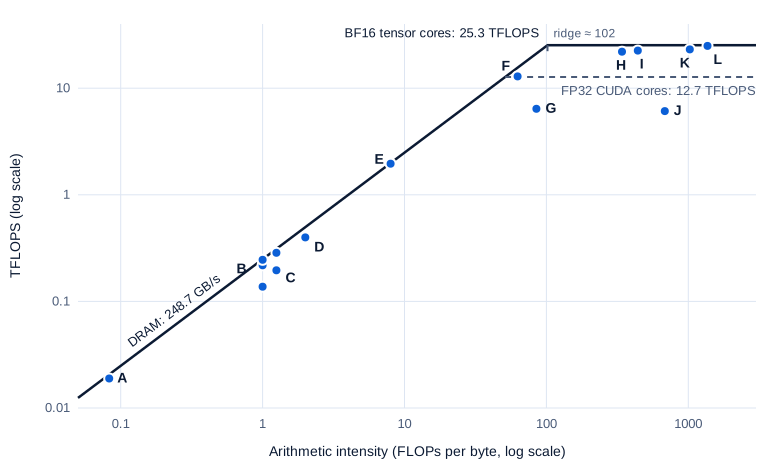
Swipe to pan the diagram, or tap it to zoom.
Reading the chart
Most points sit on the roof. The ones below it:
silu(g) * u(in B) looks like a 55% kernel, but eager PyTorch runs it as two kernels, and the multiply reads back whatsiluwrote. That’s 10 bytes per element instead of 6, so the GPU actually moved 229 GB/s; the missing fusion, which Part 9 adds, costs 40% of the time.- Softmax (in C) moves the same bytes per element as RMSNorm yet runs 1.5 times slower. Nsight Compute, in Step 3, shows it is neither memory- nor compute-bound.
- The 256 matmul (G) has the intensity to reach 21 TFLOPS but manages 6.4. A 256 × 256 output is too little work to fill 24 SMs, so its 5.2 µs is latency, not either roof.
- The FP32 matmul (J) runs at 48% of the FP32 roof; at the 1,605 MHz clock it actually ran at, that’s 62%, the same figure Part 1 found.
The bytes in the table are minimums. Nsight Compute counted 117.47 MB read from DRAM for the GEMV, against 117.48 MB counted by hand. For the 4,096 matmul it counted 215 MB against the minimum 101 MB, because three 33.5 MB matrices don’t fit in the 32 MB L2 and tiles get read more than once; the intensity is still about 640.
Finding the bottleneck
The procedure that falls out of the chart:

Faster math does nothing for a memory-bound kernel, and most of decode is memory-bound.
Step 3: Nsight Compute, one kernel in depth
Nsight Compute (ncu, version 2025.1.1 here) profiles one kernel at a time by replaying it many times, collecting a different set of hardware performance counters on each pass. Its first section, Speed of Light (SOL), reports “the achieved percentage of utilization with respect to the theoretical maximum” for compute and for memory, per the Kernel Profiling Guide. Here are the vector add and the 4,096 BF16 matmul side by side, trimmed:
$ ncu --section SpeedOfLight --section WarpStateStats --print-details all ./ceilings vadd once
(two reports, trimmed and placed side by side)
                                         vadd     matmul bf16 n=4096
    DRAM Frequency                Ghz    6.99     6.99
    SM Frequency                  Ghz    1.32     1.32
    Duration                      ms     3.89     8.60
    DRAM Throughput               %     90.90    11.17
    Compute (SM) Throughput       %     13.53    49.29
    Warp Cycles Per Issued Instruction  141.66    21.66
    Stall Long Scoreboard         inst  132.95     0.03
    Stall Math Pipe Throttle      inst    0.10    14.22
The vector add reaches 91% of DRAM throughput. The warp stall reasons show what its warps wait for. Each warp spent on average 141.7 cycles between instructions, 133 of them in “Long Scoreboard,” which the guide defines as waiting “for a scoreboard dependency on a L1TEX (local, global, surface, texture) operation”: a load from memory. The matmul’s warps stall mostly in “Math Pipe Throttle,” “waiting for the execution pipe to be available,” and the guide adds that “when this reason dominates, the kernel is usually compute-pipeline-bound.”
The 49% that was really 98.6%
Why, then, does the compute-bound matmul show 49.29% compute throughput? The matmul ran ampere_bf16_s1688gemm_bf16_128x128, a cuBLAS tensor-core kernel. Nsight Compute’s tensor roofline section (--section SpeedOfLight_HierarchicalTensorRooflineChart) lists the peak per data type:
DRAM Roofline (Src:bf16 Dst:fp32 Sparsity:off)   Theoretical Tensor Operations  12288 /cycle
DRAM Roofline (Src:fp16 Dst:fp16 Sparsity:off)   Theoretical Tensor Operations  24576 /cycle
DRAM Achieved Value (Src:bf16 Dst:fp32 ...)      Tensor Operations Per Cycle    12112.88
12,113 of 12,288 is 98.6%. The headline number is 12,113 ÷ 24,576 = 49.3%: the SOL percentage is measured against the tensor pipeline’s fastest mode, FP16 inputs with FP16 accumulation, and on this GeForce chip BF16 with FP32 accumulation runs at half that rate, as the whitepaper’s table shows. Time confirms it: 137.4 GFLOP in 8.60 ms is 16.0 TFLOPS, and the BF16 peak at the 1.32 GHz clock Nsight Compute ran at is 24 × 512 × 1.32 GHz = 16.2 TFLOPS.
PyTorch exposes that FP16 mode as torch.backends.cuda.matmul.allow_fp16_accumulation, which its CUDA notes say trades speed for “numerical precision and greater likelihood of overflow.” In Step 1 it reached 37.95 TFLOPS, 1.58 times the FP32-accumulate rate, at a clock that fell to 1,635 MHz.
A kernel below both roofs
The softmax shows what “neither” looks like:
cunn_SoftMaxForwardReg<BFloat16, float, BFloat16, ...>  (8192, 1, 1)x(1024, 1, 1)
    DRAM Throughput               %   44.00
    Compute (SM) Throughput       %   50.97
    Theoretical Occupancy         %   66.67    (Block Limit Warps: 1 block per SM)
    Stall Not Selected / Barrier / Wait   2.68 / 2.60 / 2.00 cycles
Neither unit passes 51%. Each 1,024-thread block handles one 4,096-element row, only one such block fits on an SM (a limit of 1,536 threads), and each row needs block-wide reductions for its maximum and sum, so warps wait at barriers. One of Nsight Compute’s rules flagged it: “Achieved compute throughput and/or memory bandwidth below 60.0% of peak typically indicate latency issues.” Part 8 writes softmax kernels that avoid this.
Clock control
Every report above shows a 1.32 GHz SM clock. Nsight Compute’s command-line docs explain that with --clock-control base, “GPC and memory clocks are locked to their respective base (rated tdp) frequency during profiling.” That’s the default in 2025.1 (version 2026.3 of the docs lists a new boost default). Locking makes counters repeatable but changes durations:
| Kernel | ncu, base | ncu, none | CUDA events, warm GPU |
|---|---|---|---|
| Vector add (memory-bound) | 3.91 ms | 3.91 ms | 3.55 ms |
| FMA peak (compute-bound) | 19.88 ms | 16.20 ms | 12.15 ms |
| BF16 matmul n = 4,096 | 8.60 ms | 7.01 ms | 5.52 ms |
With none, the GPU stayed at 1,620 MHz, the clock it idles at, because the profiler runs one kernel at a time. The memory-bound kernel didn’t care about the SM clock at all; the compute-bound ones scaled with it. A kernel’s time follows the resource it is bound by. So quote Nsight Compute’s ratios and counts, and time with CUDA events.
Step 4: Nsight Systems and the PyTorch profiler
Nsight Compute zooms in on one kernel. Nsight Systems (nsys) zooms out: a timeline of CPU threads, CUDA API calls and GPU work across a whole program. The test is eager decode of Qwen2.5-1.5B-Instruct in BF16 at batch size 1, Part 1’s workload, with NVTX ranges (NVIDIA Tools Extension, named markers the program pushes and pops) around each step:
torch.cuda.profiler.start()                        # nsys --capture-range=cudaProfilerApi
for i in range(5):
    torch.cuda.nvtx.range_push(f"decode step {i}")
    nxt = step(cache, nxt)
    torch.cuda.synchronize()
    torch.cuda.nvtx.range_pop()
torch.cuda.profiler.stop()
$ nsys profile -t cuda,nvtx --capture-range=cudaProfilerApi -o decode_nsys python decode_profile.py nsys
$ nsys stats -r nvtx_sum,cuda_api_sum decode_nsys.nsys-rep
Time (%) Total Time (ns) Num Calls Avg (ns) Med (ns) Min (ns) Max (ns) Name
88.0 58445824 5710 10235.7 7884.0 4584 542391 cudaLaunchKernel
11.8 7817059 5 1563411.8 1550542.0 1447508 1643308 cudaDeviceSynchronizeFive steps made 5,710 launch calls, 1,142 per step, with a median of 7.9 µs each: 11.7 ms per step spent inside cudaLaunchKernel alone. Each step’s final synchronize waited a median of only 1.55 ms. Had the GPU been the bottleneck, the CPU would have finished queuing early and waited long at the synchronize; instead, the GPU was nearly caught up when the last kernel was launched. The steps took 27 to 45 ms under nsys, against 22.95 ms without it (median of 50).
On this machine, nsys recorded the CPU side only. Version 2024.6, from CUDA 12.8, warned that the installed driver was newer than it supports; version 2025.6.3, used above, reported “CUDA hardware tracing is not supported on this system.” Neither produced GPU kernel rows under WSL2, so the kernel view below comes from the PyTorch profiler. On native Linux or Windows, the same command adds a GPU row with every kernel.
The PyTorch profiler
torch.profiler records PyTorch operators on the CPU and, through NVIDIA’s CUPTI tracing library, every kernel on the GPU. The profiler recipe covers the options used here: record_shapes saves operator input shapes, key_averages() builds a table, and export_chrome_trace writes a timeline for chrome://tracing or Perfetto:
with profile(activities=[ProfilerActivity.CPU, ProfilerActivity.CUDA], record_shapes=True) as prof:
    for i in range(5):
        with record_function(f"decode step {i}"):
            nxt = step(cache, nxt)
            torch.cuda.synchronize()
print(prof.key_averages().table(sort_by="cuda_time_total", row_limit=12))
prof.export_chrome_trace("decode_trace.json")
Name Self CPU Self CUDA Self CUDA % # of Calls
aten::linear 5.846ms 0.000us 0.00% 985
std::enable_if<!(false), void>::type internal::gemvx... 0.000us 69.761ms 88.31% 705
aten::mm 16.314ms 66.503ms 84.19% 565
Self CPU time total: 324.993ms
Self CUDA time total: 78.995msFrom the trace file: 1,142 kernels per step (the same count nsys saw as launches), 15.80 ms of GPU work per step, and 197 matrix-vector kernels taking 14.25 ms of it. Those GEMVs stream the model’s 3.087 GB of weights at 217 GB/s, on the bandwidth roof. Against the 22.95 ms unprofiled step, the GPU sat idle 31% of the time.
The profiler’s own CPU cost is large: 325 ms of CPU time for five steps, stretching each step to 61 to 69 ms. Trust its kernel durations, not its gaps or CPU timings. nsys adds less overhead and shows the whole system; torch.profiler maps each kernel back to the PyTorch operator and input shapes that launched it. Part 9 removes the idle time with CUDA graphs and fusion.
Step 5: clocks, power limits and throttling
Every roof above depends on two clocks: SM FLOPs scale with the SM clock, and bandwidth scales with the memory clock. On a laptop, neither is fixed. nvidia-smi -q -d PERFORMANCE,CLOCK,POWER, captured 12 seconds into a BF16 matmul loop (trimmed):
    Performance State                                  : P3
    Clocks Event Reasons
        SW Power Cap                                   : Active
        HW Thermal Slowdown                            : Not Active
        SW Thermal Slowdown                            : Not Active
    GPU Power Readings
        Average Power Draw                             : 50.01 W
        Current Power Limit                            : 50.00 W
        Default Power Limit                            : 40.00 W
    Clocks
        SM                                             : 1980 MHz
        Memory                                         : 7000 MHz
    Max Clocks
        SM                                             : 3105 MHz
        Memory                                         : 8001 MHz
The nvidia-smi documentation defines SW Power Cap: the “SW Power Scaling algorithm is reducing the clocks below requested clocks because the GPU is consuming too much power.” The GPU was drawing its full limit. Changing that limit (nvidia-smi -pl) or locking clocks (-lgc) needs administrator rights and changes the machine, so this article only observes.
To watch it over time, nvidia-smi --query-gpu=timestamp,pstate,clocks.sm,clocks.mem,power.draw,enforced.power.limit,temperature.gpu,clocks_event_reasons.active --format=csv -lms 200 logged every 200 ms while a script ran one kernel back to back, starting from an idle GPU, timing each quarter-second batch with CUDA events. First, 90 seconds of BF16 matmuls at n = 4,096:
| Seconds | TFLOPS | SM clock | Memory clock | Power | Limit | Temperature | BF16 peak at that clock |
|---|---|---|---|---|---|---|---|
| 0 to 0.5 | 12.02 | 1,620 MHz | 7,000 MHz | 14.1 W | 39.0 W | 63 °C | 19.9 TFLOPS |
| 0.5 to 1 | 21.71 | 1,822 | 6,435 | 41.3 | 40.4 | 69 | 22.4 |
| 2 to 5 | 22.87 | 1,898 | 5,870 | 43.9 | 43.9 | 72 | 23.3 |
| 10 to 20 | 23.04 | 1,905 | 5,870 | 45.5 | 45.4 | 75 | 23.4 |
| 45 to 60 | 22.79 | 1,890 | 5,870 | 45.3 | 45.3 | 78 | 23.2 |
| 75 to 90 | 23.19 | 1,920 | 5,870 | 47.2 | 47.2 | 79 | 23.6 |
The first half second ran at half speed: the GPU was still in P3 at 1,620 MHz, the warm-up trap from Part 2. After that, power sat on the limit with SW power cap active the whole time, and cuBLAS stayed at 97% to 99% of the peak at the running clock. The limit itself drifted from 39 to 47 W, which looks like the laptop shifting its shared power budget between CPU and GPU. The temperature climbed to 79 °C without any thermal flag. The kernel stayed efficient while the roof above it came down, to about 20% below the 29.1 TFLOPS spec.
Meanwhile the driver dropped memory to 5,870 MHz, which puts the bandwidth roof at 5,870 × 2 × 16 bytes = 188 GB/s. Then 60 seconds of decode-style GEMVs over 470 MB of weights:
| Seconds | GB/s | SM clock | Memory clock | Power | State | Bandwidth roof at that clock |
|---|---|---|---|---|---|---|
| 0.5 to 1 | 216.9 | 1,822 MHz | 7,000 MHz | 44.2 W | P3 | 224 GB/s |
| 2 to 5 | 247.8 | 1,462 | 8,000 | 48.4 | P0 | 256 |
| 10 to 20 | 247.9 | 1,545 | 8,000 | 50.0 | P0 | 256 |
| 30 to 45 | 217.0 | 1,665 | 7,000 | 45.4 | P0, P3 | 224 |
| 45 to 60 | 216.9 | 1,680 | 7,000 | 44.1 | P0, P3 | 224 |
For memory-bound work the driver did the opposite, raising memory to 8,000 MHz in the P0 state and lowering the SM clock to about 1.5 GHz to stay under 50 W. The GEMV hit 247.9 GB/s, 97% of the rating. Thirty seconds in, it dropped back to 7,000 MHz, and the same kernel lost 12% of its speed, still at 97% of the lower roof.
So the ridge point moves too. With the SM at 1,890 MHz and memory at 5,870 MHz, it’s 23.2 TFLOPS ÷ 188 GB/s ≈ 124 FLOPs per byte; with the SM at 1,515 MHz and memory at 8,000 MHz, it’s 18.6 ÷ 256 ≈ 73. A laptop benchmark means little without its clocks logged beside it.
In the real world
Data center rooflines
Here is the same arithmetic for NVIDIA’s data center parts, using dense figures as Inference Part 3 explains (the datasheets print sparse numbers twice as large):
| GPU | Dense BF16 | Bandwidth | BF16 ridge (FLOPs per byte) | Batch-1 decode intensity |
|---|---|---|---|---|
| RTX 4060 Laptop (measured here) | 25.3 TFLOPS | 248.7 GB/s | 102 | 1 |
| H100 SXM | 989 TFLOPS | 3.35 TB/s | 295 | 1 |
| B200 (DGX B200 ÷ 8) | 2,250 TFLOPS | 8 TB/s | 281 | 1 |
The H100 page lists 1,979 BF16 TFLOPS marked “With sparsity,” and the DGX B200 page lists 72 PFLOPS of FP8 for eight GPUs, noting “Dense performance is ½ sparse spec shown”: 4.5 PFLOPS of dense FP8 per GPU and half that for BF16. In FP8, the B200’s ridge doubles to about 562, while an FP8 weight gives decode only 2 FLOPs per byte.
The data center ridges sit about three times further right than this laptop’s, and batch-1 decode sits at 1 on all of them. That’s why Inference Part 1 found single-user decode using well under 1% of an H100’s arithmetic, and why serving systems batch users to climb toward the ridge.
Profilers in practice
Nsight Compute’s guide notes that “hierarchical roofline overlays can separate L1, L2, and DRAM bandwidth ceilings,” the same idea as Step 1’s L2 row. With an L2 roof of 1.44 to 1.6 TB/s (Part 3 measured 1,440 GB/s with L1 out of the picture), a kernel whose data stays in L2 needs only about 25.3 TFLOPS ÷ 1.5 TB/s ≈ 17 FLOPs per byte of L2 traffic to be compute-bound, which is why tiling (Part 3) pays. The usual order is torch.profiler or nsys to find which kernels and gaps dominate a step, then ncu on the few kernels that matter.
Common misconceptions
- “A low Speed of Light percentage means wasted hardware.” Nsight Compute reported a cuBLAS BF16 matmul at 49% compute throughput while its tensor roofline showed 98.6% of the BF16 peak. The SOL percentage was measured against the pipeline’s FP16-accumulate rate, twice the BF16 one on this GPU.
- “Profiler durations are real durations.” Nsight Compute locks clocks to base by default: 1.32 GHz here, against 2.16 GHz in normal use. The FMA kernel took 19.88 ms under
ncuand 12.15 ms with CUDA events. Use profilers for counts and ratios, events for time. - “Memory-bound means the GPU is slow.” The decode GEMV and the SDPA decode kernel ran at 88% to 99% of the bandwidth roof. They’re as fast as the memory allows; only fewer bytes or more reuse can help.
- “A kernel below the roof is badly written.” Eager
silu(g) * ulooked like 55% of the roof but moved 229 GB/s; the fault was two kernels where one would do. The 256 matmul was simply too small to fill the GPU. - “The roofline is fixed for a given GPU.” On this laptop the bandwidth roof moved between 188, 224 and 256 GB/s as the driver changed the memory clock, and the BF16 roof sat 20% below the spec under a 39 to 50 W power limit.
Key takeaways
- The roofline says a kernel’s speed is capped by the smaller of peak compute and bandwidth times arithmetic intensity. On this laptop, the measured ridge is about 102 FLOPs per byte for BF16.
- Count FLOPs and bytes by hand before profiling. Decode GEMVs, norms and softmax sit near 1 FLOP per byte; a square matmul sits at n/3.
- Nsight Compute explains one kernel: Long Scoreboard stalls mean waiting on memory, Math Pipe Throttle means the math units are full, and low numbers everywhere mean latency. Check which peak a percentage is measured against.
- Nsight Systems and the PyTorch profiler explain a whole step. In eager decode, 1,142 launches per step at about 8 µs each kept the GPU idle 31% of the time.
- Laptop roofs move. Log
nvidia-smiclocks, power and event reasons next to every benchmark, and compare results with the roof at the clock the kernel actually ran.
What’s next
The matmuls on this chart came from cuBLAS and sat right under the roof. Part 5, Writing a fast matmul, step by step, builds one by hand: a naive kernel first, then coalescing, shared-memory tiling, register blocking and vectorized loads, measuring GFLOPS and placing each version on this roofline until it closes in on cuBLAS.
Further reading
- Roofline: An Insightful Visual Performance Model for Multicore Architectures (Williams, Waterman and Patterson, Communications of the ACM, 2009): the original model, ridge points and ceilings; the UC Berkeley technical report has the full text.
- Nsight Compute Kernel Profiling Guide (NVIDIA): Speed of Light, roofline charts, warp stall reasons and clock control.
- Nsight Compute CLI documentation (NVIDIA): sections,
--print-detailsand--clock-control. - Nsight Systems User Guide (NVIDIA): timelines, NVTX, capture ranges and
nsys statsreports. - PyTorch Profiler recipe (PyTorch):
record_shapes,key_averagesand exporting traces. - CUDA semantics: FP16 accumulation (PyTorch docs): the
allow_fp16_accumulationswitch and its precision trade-off. - nvidia-smi documentation (NVIDIA): performance states, clocks event reasons and power readings.
- NVIDIA Ada GPU Architecture whitepaper (NVIDIA): the per-format tensor-core rates behind this GPU’s roofs.
- Making Deep Learning Go Brrrr From First Principles (Horace He): compute, bandwidth and overhead as the three regimes, with intuition to match the chart.