
LLMs on the GPU: Kernels and Hardware · Part 1 of 15
From torch.matmul to Silicon: What Happens When PyTorch Runs
Follow one matmul from Python through the dispatcher, cuBLAS and a CUDA stream to the GPU, then trace one decode step of a real model on a laptop GPU.
On this page
TL;DR
When you write c = a @ b in PyTorch, your Python code never touches the GPU. The CPU looks up which implementation to run, asks NVIDIA’s cuBLAS library to pick a GPU program (a kernel), drops that kernel into a queue (a CUDA stream), and returns, often before the GPU has started. That lets the CPU run ahead of the GPU, and it’s also why small workloads waste most of the GPU’s time. On a laptop RTX 4060, one decode step of a 1.5-billion-parameter model launched 1,143 kernels: the GPU needed 13.8 ms to run them, and Python needed 30 ms to hand them over. By the end you’ll know how to time GPU code correctly, why big matrix multiplications reach 98% of the chip’s peak at its running clock while small ones reach almost nothing, and how CUDA graphs and torch.compile made the same decode step 1.7 times faster.
Why it matters
Here are ten 4096 × 4096 matrix multiplications in a Python loop on a laptop GPU. The loop finishes in 0.56 milliseconds. The GPU finishes the work 242 milliseconds later.
GPU work in PyTorch is asynchronous: each call queues work and returns. Time GPU code the way you’d time ordinary Python and you measure the queuing, not the math.
The same mechanism costs LLMs real speed. Generating one token runs every layer of the model, and in plain PyTorch every small operation becomes its own GPU program, queued separately by the CPU. When those programs are tiny, the GPU finishes each one before the next arrives. In the decode step measured below, the GPU sat idle 57% of the time.
This is Part 1 of a 15-part series that goes one level below Inference Part 3 (how GPUs work) and Inference Part 7 (FlashAttention and fused kernels): real code, timed on a real GPU.
The intuition
Picture a restaurant. The waiter (the CPU) takes your order, writes a ticket, and clips it onto the rail above the kitchen (the stream). The kitchen (the GPU) cooks tickets in the order they arrive. The waiter doesn’t stand at the pass waiting for your soup, but goes straight back to take the next order. If you want to know when your food is ready, you have to ask the waiter to go and wait at the pass for it. That’s a synchronization.
For a banquet of large dishes this works well: the waiter clips twenty tickets in a minute and the kitchen is busy for an hour. Now order 1,143 garnishes, one ticket each. Each garnish takes the kitchen four seconds, but writing each ticket takes the waiter ten. The cooks spend most of the evening watching the rail. The fix is a set menu: one ticket that says “the usual, all 1,143 items,” which is what a CUDA graph is.
The analogy breaks in two places. In a GPU kitchen, every dish is cooked by all the stations at once, each doing a slice of it, instead of one cook per ticket. And most of the waiter’s ticket-writing time goes into Python and PyTorch working out what to cook, which the next sections measure.
Step 1: what happens when you call a @ b
A few terms first, in the words of NVIDIA’s CUDA Programming Guide. The CPU and its memory are the host; a GPU and its memory are the device. A function that runs on the GPU is, “for historical reasons, called a kernel,” and “the act of starting a kernel running is called launching the kernel.” CUDA is NVIDIA’s platform for programming its GPUs.
When Python reaches c = a @ b with both tensors on the GPU, four things happen on the CPU:
- Python calls into PyTorch’s C++ core.
- PyTorch’s dispatcher, the layer that routes every operation to the right implementation, looks at the inputs. Edward Yang’s tour of the dispatcher describes it as a table per operator, with entries “for backends (CPU, CUDA, XLA) as well as higher-level concepts like autograd and tracing.” Tensors on a CUDA device select the CUDA implementation of matrix multiply.
- That implementation calls cuBLAS, NVIDIA’s “implementation of BLAS (Basic Linear Algebra Subprograms) on top of the NVIDIA CUDA runtime,” per the cuBLAS docs. cuBLAS picks a kernel suited to the sizes, the number format and the GPU.
- cuBLAS launches that kernel onto a CUDA stream, which the guide’s asynchronous execution chapter says “operates like a work-queue into which programs can add operations, such as memory copies or kernel launches, to be executed in order.”
Then the call returns. In the guide’s words, “the kernel launch is asynchronous and returns immediately.” PyTorch’s CUDA semantics notes say that GPU operations “are enqueued to the particular device, but not necessarily executed until later.”
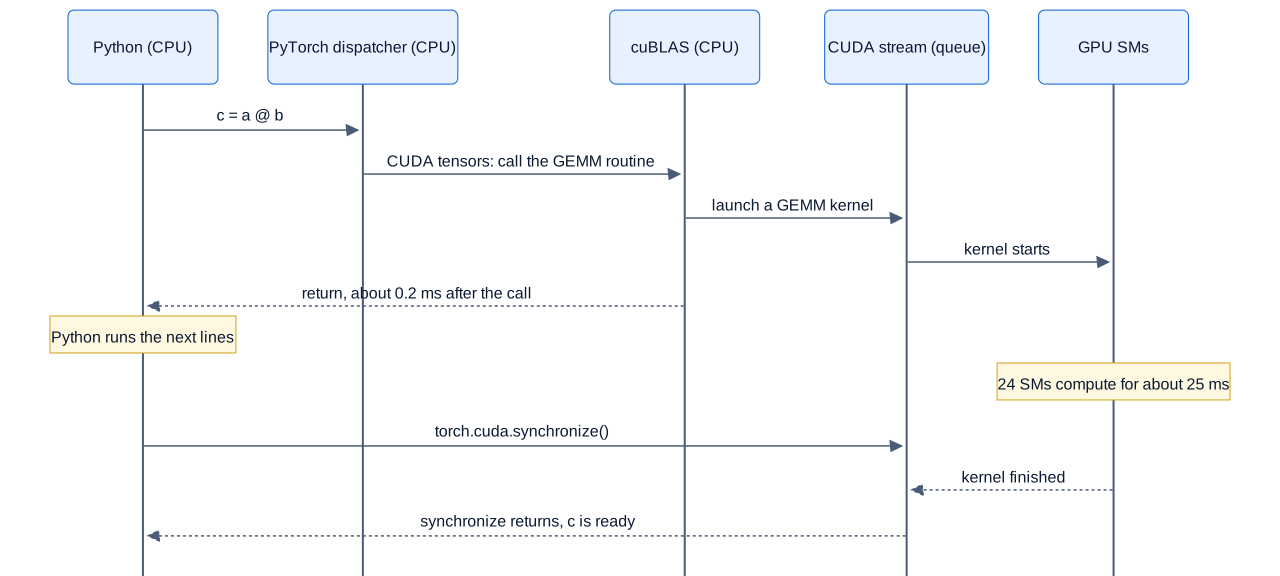
Swipe to pan the diagram, or tap it to zoom.
The CPU is done once the kernel is launched, while the GPU has barely started.
Measuring it
Here is the experiment. torch.cuda.synchronize() makes the CPU wait until everything queued on the GPU has finished.
import time, torch

a = torch.randn(4096, 4096, device="cuda")   # FP32 by default
b = torch.randn(4096, 4096, device="cuda")
for _ in range(10): a @ b                     # warm-up
torch.cuda.synchronize()

t0 = time.perf_counter()
c = a @ b                                     # queue the work
t1 = time.perf_counter()
torch.cuda.synchronize()                      # wait for the GPU
t2 = time.perf_counter()
print(f"returned after {(t1-t0)*1e3:.2f} ms, done after {(t2-t0)*1e3:.2f} ms")
Over 30 runs, the call returned after a median of 0.21 ms and the result was ready after 24 ms, more than 100 times longer. With another matmul already queued, the same call returned after just 21 microseconds (µs, millionths of a second); on this machine, the first launch onto an idle GPU is the slow case.
Leave out the synchronize and you’d report a matmul 100 times faster than it is. PyTorch’s docs warn that “time measurements without synchronizations are not accurate” and recommend either synchronizing or CUDA events, markers that the GPU itself timestamps as it reaches them in the stream:
start = torch.cuda.Event(enable_timing=True)
end = torch.cuda.Event(enable_timing=True)
start.record(); c = a @ b; end.record()
end.synchronize()                    # wait until the GPU reaches `end`
print(start.elapsed_time(end), "ms")
CUDA events put the same matmul at 26.5 ms. The two numbers come from separate loops, and a laptop GPU’s clock shifts with power and temperature, so expect spreads of a few milliseconds.
How the numbers in this series are measured
Every number in this article comes from one machine: an NVIDIA GeForce RTX 4060 Laptop GPU (8 GB) with an AMD Ryzen 9 8945HS CPU, under WSL2 (Ubuntu on Windows), NVIDIA driver 592.82, PyTorch 2.11.0 with its bundled CUDA 12.8 runtime, Triton 3.6.0 and Hugging Face Transformers 5.20.2. GPU times come from CUDA events or from torch.profiler (which records every kernel through NVIDIA’s CUPTI tracing library), after warm-up runs, as the median of 7 to 100 repeats. Laptop GPUs run at different power limits. During these runs nvidia-smi showed the GPU drawing up to about 50 W (it reports a 40 W default and 50 W maximum power limit), the SM clock between 1.3 and 2.2 GHz, and the memory clock mostly at its full 8,000 MHz, dropping to 7,000 or 5,870 MHz during some long matmul runs. The same GPU in a laptop allowed 115 W should post higher numbers.
Step 2: kernels, grids and the launch
A kernel is written as the code for one thread; a launch starts many copies at once. The CUDA Programming Guide explains: “When an application launches a kernel, it does so with many threads, often millions of threads. These threads are organized into blocks,” and the blocks form a grid. Each thread reads its own position in the grid to work out which piece of the data is its job. Part 2 covers threads, warps and blocks properly.
The hardware that runs the blocks is the SM (streaming multiprocessor), the GPU’s basic unit of cores, on-chip memory and schedulers, which Inference Part 3 describes for the H100. The GPU hands out blocks to SMs as they free up. You can ask PyTorch how many SMs your GPU has:
p = torch.cuda.get_device_properties(0)
print(p.name, p.multi_processor_count, p.L2_cache_size // 2**20, "MB L2")
# NVIDIA GeForce RTX 4060 Laptop GPU 24 32 MB L2
This GPU has 24 SMs; an H100 has 132. A kernel with fewer blocks than there are SMs leaves part of the chip idle however fast each block runs, which matters in Step 3.
What one launch costs
To price a launch on its own, launch a kernel that does almost nothing: add 1 to a single number, 10,000 times in a row.
x = torch.zeros(1, device="cuda")
torch.cuda.synchronize()
t0 = time.perf_counter()
for _ in range(10_000):
    x.add_(1.0)            # one tiny kernel per call
t1 = time.perf_counter()
torch.cuda.synchronize()| What was measured (median of 7 × 10,000 calls) | Time per call |
|---|---|
CPU time to issue one add_ (Python, dispatcher, launch) | 9.2 µs |
| The kernel itself on the GPU, from the profiler | 4.0 µs |
| GPU timeline per call (kernel plus idle gap), from CUDA events | 10.8 µs |
One add_ followed by synchronize(), a full round trip | 29 µs |
The GPU needed 4 µs per kernel but received a new one only every 10.8 µs, so it was busy about 37% of the time, waiting on the CPU for the rest. Horace He measured the same effect on an A100 in Making Deep Learning Go Brrrr: plain Python manages “32 million additions in one second,” while through PyTorch “we can only get 280 thousand operations per second.” Inference Part 7 quotes NVIDIA’s own launch measurements on a V100, with the same pattern. CPU-side costs depend on the CPU, the operating system and the driver, and this machine adds WSL2’s virtualization layer, so treat these as this machine’s numbers.
Step 3: the matrix multiply itself
How fast can this GPU multiply matrices? NVIDIA’s laptop GPU comparison page lists the RTX 4060 Laptop GPU with 3,072 CUDA cores, a boost clock of 1,470 to 2,370 MHz depending on the laptop, 8 GB of GDDR6 on a 128-bit bus, and 35 to 115 W of GPU subsystem power. It gives “233 AI TOPS” but no TFLOPS (trillions of floating-point operations per second) per number format.
You can derive them. The NVIDIA Ada GPU Architecture whitepaper lists the RTX 4090’s peak rates: 128 SMs at 2,520 MHz, 82.6 TFLOPS of FP32, 82.6 of TF32 on tensor cores, 165.2 of BF16 “with FP32 Accumulate” and 660.6 TOPS of INT8 (all dense, without the sparsity feature). Dividing by 128 SMs and 2.52 GHz gives each Ada SM’s rate per clock cycle; multiplying by this GPU’s 24 SMs and 2.37 GHz gives its peaks:
per SM per clock (from the 4090):  FP32 256,  TF32 256,  BF16 512,  INT8 2,048 operations
RTX 4060 Laptop at 2,370 MHz:     FP32 = 24 × 256 × 2.37 GHz ≈ 14.6 TFLOPS
                                  TF32 ≈ 14.6 TFLOPS,  BF16 ≈ 29.1 TFLOPS
check:  INT8 × 2 for sparsity = 24 × 2,048 × 2.37 GHz × 2 ≈ 233 TOPS  (NVIDIA's "AI TOPS")
The derived figure matches NVIDIA’s 233 AI TOPS, a good sign the per-SM rates carry over. These are peaks at the top of the boost range, and the measured clock under load was lower.
Measured: small, medium and large
The sweep below times n × n matrix multiplies launched back to back between two CUDA events, so launch cost shows up when it dominates. BF16 and FP16 matmuls in PyTorch accumulate in FP32, so 29.1 TFLOPS is their ceiling. An n × n matmul does 2n³ floating-point operations: n³ multiplies and n³ adds.
| n | BF16 time per matmul | BF16 TFLOPS | BF16 kernel alone (profiler) | FP32 TFLOPS | TF32 TFLOPS |
|---|---|---|---|---|---|
| 64 | 15.5 µs | 0.03 | 2.2 µs | 0.02 | 0.02 |
| 128 | 17.3 µs | 0.24 | 2.4 µs | 0.25 | 0.23 |
| 256 | 17.6 µs | 1.9 | 5.0 µs | 1.8 | 2.0 |
| 512 | 24.2 µs | 11.1 | 18.2 µs | 5.8 | 8.5 |
| 1,024 | 103 µs | 20.8 | 91 µs | 5.8 | 11.1 |
| 2,048 | 694 µs | 24.7 | 634 µs | 5.4 | 11.8 |
| 4,096 | 6.34 ms | 21.7 | 5.77 ms | 5.1 | 10.3 |
| 8,192 | 49.4 ms | 22.3 | 48.2 ms | 5.4 | 10.5 |
Three regimes show up:
- From 64 to 256, the time per matmul barely moves, 15 to 18 µs, while the work grows 64-fold. The kernels take 2 to 5 µs; the rest is launch overhead. These sizes are launch-bound: a faster GPU wouldn’t help at all.
- At 512 and 1,024, the GPU is starting to work but isn’t full. If a 512 × 512 output is split into 128 × 128 tiles, one per block, there are only 16 tiles for 24 SMs.
- From 2,048 up, the chip is busy and the rate levels off between 21 and 25 TFLOPS. That’s compute-bound territory.
Is 25 TFLOPS good? In a separate run of about 4 seconds per case, with nvidia-smi sampling the clock, BF16 at n = 4,096 averaged 24.1 TFLOPS while the SM clock sat near 1,995 MHz. At that clock the peak is 24 × 512 × 1.995 GHz = 24.5 TFLOPS, so cuBLAS reached 98% of what the silicon could do at that moment. The laptop hit its power limit and lowered the clock, but the kernel itself wasted almost nothing.
FP32 did worse: 5.9 TFLOPS at a 1,560 MHz clock, 62% of that clock’s 9.6 TFLOPS peak. FP32 matmuls run on the ordinary CUDA cores, and under the same 50 W limit the clock settled lower. TF32, which rounds FP32 inputs to a shorter mantissa so tensor cores can do the multiply, reached 11.4 TFLOPS, almost twice FP32’s speed. PyTorch doesn’t use it unless you ask: its docs say the allow_tf32 flag defaults to “False in PyTorch 1.12 and later,” because the result is less precise.
Where decode sits on the roofline
Inference Part 1 introduced the roofline: a kernel is memory-bound if it does fewer floating-point operations per byte moved than the GPU’s ratio of compute to bandwidth. For this GPU that ratio, the ridge point, is 29.1 TFLOPS ÷ 256 GB/s ≈ 114 operations per byte. An n × n BF16 matmul reads two matrices and writes one, 6n² bytes, for 2n³ operations: n/3 operations per byte, which passes the ridge at n ≈ 342.
Decoding one token for one user sits at the other extreme. Every weight matrix multiplies a single vector (a matrix-vector product, GEMV, rather than a matrix-matrix product, GEMM): 2 operations per 2-byte weight, so 1 operation per byte, about a hundredth of the ridge, deep in the region where only bandwidth matters. The Math series counts these operations for Llama 3.1 8B.
Step 4: one decode step, traced
Now a real model. Qwen2.5-1.5B-Instruct has 1,543,714,304 parameters in 28 layers; in BF16 that’s 3.087 GB of weights, which fits this 8 GB GPU with room to spare. The test used a 43-token chat prompt, then greedy decoding at batch size 1, with Hugging Face Transformers and PyTorch’s built-in scaled dot-product attention.
What the profiler sees
torch.profiler recorded five decode steps after warm-up. Per step:
| Kernel category | Kernels per step | GPU time per step | Share of GPU time |
|---|---|---|---|
| Matrix-vector products (the weights) | 197 | 12.28 ms | 88.7% |
| Elementwise math (adds, multiplies, SiLU, RoPE pieces) | 627 | 0.82 ms | 5.9% |
| Copies, type casts, concatenation, indexing | 232 | 0.39 ms | 2.8% |
| Attention (a FlashAttention kernel, one per layer) | 28 | 0.20 ms | 1.5% |
| Reductions (the means inside RMSNorm, the final argmax) | 58 | 0.14 ms | 1.0% |
| Total | 1,143 (including 1 memset) | 13.84 ms | 100% |
The 197 matrix-vector kernels are 7 projections in each of 28 layers plus the output layer. They took 12.28 ms to stream 3.087 GB of weights, about 251 GB/s, which is essentially the memory’s rated 256 GB/s (a 128-bit bus at 8,001 MHz).
The other 946 kernels do 11% of the GPU work and most of the launching. One RMSNorm, the normalization applied twice per layer, launched 8 kernels in eager PyTorch (a cast to FP32, square, mean, add epsilon, reciprocal square root, multiply, cast back, multiply by the weight), for 14 µs of total GPU time on 1,536 numbers. With 57 RMSNorms per step, that’s 456 kernels, 40% of the step’s launches.
The CPU is the bottleneck
Timed without the profiler over 100 steps, the model’s forward call took 30.3 ms to return, and the step finished 1.7 ms later at 32.0 ms. The GPU needed only 13.8 ms of that. Python and PyTorch spent about 26 µs per kernel deciding what to launch and launching it, and the GPU sat idle 57% of the time. Hugging Face’s own generate loop did a little better on the same prompt, 40.2 tokens per second (24.9 ms per token), still far above the 13.8 ms of GPU work.
Removing the launches
Two tools attack this. A CUDA graph records a sequence of kernels once and replays the whole sequence with a single launch. PyTorch’s CUDA graphs docs explain that “a replay submits the entire graph’s work to the GPU with a single call to cudaGraphLaunch” and that “eliding CPU overhead is the main benefit.” The price: “Every replay reads from and writes to the same (virtual) memory addresses,” so inputs must be copied into fixed buffers and the KV cache must be preallocated (Transformers’ StaticCache) instead of growing. torch.compile, covered in Inference Part 7, goes further: it fuses chains of small operations into single generated kernels, and its mode="reduce-overhead" wraps the result in CUDA graphs.
The core of the manual capture, simplified from the measurement script (which first warms up on a side stream, as PyTorch’s docs recommend):
g = torch.cuda.CUDAGraph()
with torch.cuda.graph(g):     # record every kernel of one decode step
    next_tok = step()         # step() reads tok_buf and pos_buf, writes a StaticCache
for _ in range(n_tokens):
    g.replay()                # one launch replays all 1,372 kernels
    tok_buf.copy_(next_tok); pos_buf += 1
All three versions ran in one process with the same static cache, timed with synchronize() over 100 steps after warm-up. All three produced the same greedy tokens.
| Version | Kernels per step | GPU busy | Time per step | Tokens/s | Speedup |
|---|---|---|---|---|---|
| Eager PyTorch, static cache | 1,372 | 15.2 ms | 26.8 ms | 37.4 | 1.0× |
| Same step, captured as a CUDA graph | 1,372 | 15.7 ms | 16.1 ms | 62.0 | 1.66× |
torch.compile(mode="reduce-overhead") | 508 | 14.3 ms | 15.5 ms | 64.4 | 1.72× |
The static cache adds kernels of its own (1,372 per step instead of 1,143), but with the graph the CPU’s part of a step fell to about 1 ms, and the GPU, now fed continuously, set the pace. nvidia-smi agreed, reporting the GPU busy about 60 to 65% of the time in eager mode and 97% with the graph. torch.compile then cut the kernel count to 508 by fusing the small operations, which trimmed GPU busy time from 15.7 to 14.3 ms and the step by another 0.6 ms. It took 23 seconds to compile.
How close to the limit?
Each step must read all 3.087 GB of weights once. At the rated 256 GB/s that takes 12.06 ms, a ceiling of 82.9 tokens per second. The compiled step ran at 15.5 ms, 78% of that ceiling; eager PyTorch reached 45%. A simple test of matrix-vector products over 2.15 GB of separate weight matrices on this GPU achieved 235 GB/s, which would put a practical ceiling near 76 tokens per second. Inference Part 13 found the same pattern on this laptop with llama.cpp: a 4.92 GB model at 44.7 tokens per second, close to its bandwidth ceiling.
Step 5: a map of the series
The remaining parts take this picture apart one piece at a time, with code you can run and numbers measured on the same laptop. Data center features the laptop lacks come from NVIDIA’s documentation and are labeled as not measured here.
| Part | Title | The question it answers |
|---|---|---|
| 1 | From torch.matmul to silicon | What happens between Python and the GPU, and why is small work slow? |
| 2 | The CUDA programming model | How do threads, warps, blocks and grids work, and how do you write and time a first kernel? |
| 3 | The memory hierarchy | How fast are registers, shared memory, L2 and DRAM, and why do access patterns matter? |
| 4 | Profiling and the roofline | How do Nsight and the PyTorch profiler show where a kernel’s time goes? |
| 5 | Writing a fast matmul, step by step | How does a naive matmul become one that approaches cuBLAS? |
| 6 | Tensor cores | What does one tensor-core instruction do, and how do Hopper and Blackwell change it? |
| 7 | Triton: GPU kernels in Python | How do you write fast kernels in Python blocks instead of CUDA threads? |
| 8 | Reductions and normalization kernels | How do softmax and RMSNorm sum across thousands of threads, stably? |
| 9 | Kernel fusion, torch.compile and CUDA graphs | How do fusion and graphs remove the overhead measured here, and what does Inductor generate? |
| 10 | Writing an attention kernel | How does FlashAttention-style tiling look in code, for prefill and decode? |
| 11 | Low-precision kernels | When do INT4, INT8, FP8 and FP4 kernels actually make inference faster? |
| 12 | Mixture-of-experts kernels | How do GPUs route tokens to experts and run many small matmuls at once? |
| 13 | Many GPUs: NVLink, NCCL and collectives | How do GPUs exchange data, and what does an all-reduce cost? |
| 14 | Beyond NVIDIA | How do AMD, Apple, TPUs and other accelerators map onto the same ideas? |
| 15 | One token, kernel by kernel | Where does every microsecond of one decode step go on this laptop? |
In the real world
vLLM’s CUDA graphs design doc describes its default mode, FULL_AND_PIECEWISE, as “full CUDA Graph for uniform decode, piecewise CUDA Graphs for others”: decode steps, where every request adds one token, replay a single captured graph, while prefill keeps the attention part outside the graph. Because a graph is fixed to its shapes, engines capture one per batch size and pad real batches up to the nearest captured size, as Inference Part 7 explains.
NVIDIA’s CUDA graphs chapter describes the cost being avoided: each kernel placed in a stream requires the driver to perform “a sequence of operations in preparation for the execution of the kernel,” an overhead that “can be a significant fraction of the overall end-to-end execution time” for short kernels. With a graph, those costs “can be paid once for the entire graph during instantiation.”
The matrix multiplies come from NVIDIA’s libraries. Besides classic cuBLAS there’s cuBLASLt, “a lightweight library dedicated to GEneral Matrix-to-matrix Multiply (GEMM) operations” with more control over layouts, number formats and algorithm choice, per the cuBLAS docs. Both show up in this article’s traces: the TF32 matmul at n = 64 launched two kernels, the second a cublasLt::splitKreduce_kernel.
Data center GPUs have the same structure at a larger scale: an H100 has 132 SMs and 3.35 TB/s of memory bandwidth (Inference Part 3). It would stream this 1.5B model’s weights in under a millisecond, so eager launch overhead hurts even more there: a 1,143-kernel step would still need tens of milliseconds on a CPU like this laptop’s.
Common misconceptions
- “The GPU runs my Python code.” The CPU runs all of it. Python and PyTorch decide which kernels to launch, and only those precompiled kernels run on the GPU. In the traced decode step, the CPU spent 30 ms launching what the GPU finished in 13.8 ms.
- “
time.time()around a GPU call measures GPU time.” It measures how long the call took to queue the work. A 4096 × 4096 FP32 matmul returned in 0.21 ms and finished 24 ms later. Synchronize first, or use CUDA events. - “One PyTorch operation is one kernel.” One RMSNorm module launched 8 kernels; one decode step of a 28-layer model launched 1,143, about 40 per layer. Going the other way, torch.compile fused the same step into 508.
- “A faster GPU makes batch-1 decode much faster.” Only if the GPU is the bottleneck. In eager mode this laptop’s GPU was idle 57% of the time, so a faster GPU would mostly wait faster. Once launches were removed, the step ran at 78% of the memory-bandwidth ceiling, and from then on only more bandwidth helps, not more compute (Inference Part 13).
- “Big matrix multiplies are what make GPUs slow at small batch sizes.” The big matmuls are the efficient part: at n = 4,096 cuBLAS reached 98% of the peak at the measured clock, and the decode-step GEMVs moved data at the memory’s rated speed. The losses come from small kernels and the gaps between them.
Key takeaways
- PyTorch runs on the CPU and only queues work for the GPU. A call returns as soon as its kernel is launched onto a CUDA stream, often long before the GPU finishes.
- To time GPU code, synchronize or use CUDA events. Without them, a 24 ms matmul looks like a 0.2 ms one.
- Each kernel launch costs the CPU microseconds. When kernels are as small as decode’s, the CPU can’t keep up: one eager decode step launched 1,143 kernels and left the GPU idle 57% of the time.
- Large matrix multiplies run near the hardware peak, 98% at the measured clock on this laptop. Tiny ones are launch-bound, whatever the GPU.
- CUDA graphs replay a whole step with one launch, and torch.compile also fuses small kernels. Together they took decode from 37 to 64 tokens per second, 78% of the bandwidth limit.
What’s next
This part treated kernels as black boxes that someone else wrote. Part 2 opens the box: the CUDA programming model of threads, warps, blocks and grids, then a first kernel written, compiled and timed by hand, to see how close a simple vector add gets to this GPU’s 256 GB/s.
Further reading
- CUDA Programming Guide (NVIDIA): the official reference, especially the programming model (host, device, kernels, grids), asynchronous execution (streams and events) and CUDA graphs.
- CUDA semantics (PyTorch docs): asynchronous execution, timing with events, streams, TF32 settings and PyTorch’s CUDA graph API.
- torch.profiler (PyTorch docs): the profiler used for every kernel trace in this article.
- cuBLAS documentation (NVIDIA): the BLAS library behind PyTorch’s matrix multiplies, and its cuBLASLt GEMM API.
- NVIDIA Ada GPU Architecture whitepaper (NVIDIA): the SM design and the peak-rate tables used to derive this GPU’s TFLOPS.
- GeForce RTX 40 Series laptop specs (NVIDIA): the RTX 4060 Laptop GPU’s cores, clock range, memory and power range.
- Getting Started with CUDA Graphs (Alan Gray, NVIDIA, 2019): launch overhead measured on a V100, and how graphs remove it.
- vLLM design docs: CUDA graphs: how a production engine captures graphs for decode and prefill.
- Let’s talk about the PyTorch dispatcher (Edward Yang, 2020): how PyTorch decides which implementation of an operator runs.
- Making Deep Learning Go Brrrr From First Principles (Horace He): compute, bandwidth and overhead, and how to tell which one you’re bound by.