
LLMs on the GPU: Kernels and Hardware · Part 5 of 15
Writing a Fast Matmul in CUDA, Step by Step
Take an FP32 matrix multiply from a naive CUDA kernel to one that edges past cuBLAS on a laptop GPU, measuring and profiling every step.
On this page
TL;DR
A matrix multiply does the same arithmetic however you write it. What changes is how often each number is fetched and how many instructions surround each multiply-add. This article builds an FP32 matmul for a laptop RTX 4060 in eight versions, from a textbook kernel at 0.1 TFLOPS to one at about 6 TFLOPS, timing each against NVIDIA’s cuBLAS and using Nsight Compute counters to explain each jump: coalescing, shared-memory tiles, register blocking, vectorized loads, an occupancy fix, conflict-free shared-memory reads and double buffering. The last version reached 70% of the FP32 peak at the clock it ran at, against cuBLAS’s 62% on the same chip, and one ratio, multiply-adds per issued instruction, explains both numbers.
Why it matters
Multiply two 4,096 × 4,096 matrices of 32-bit floats on a laptop GPU. The kernel most people write first takes 1.38 seconds. The last kernel in this article does the same 137 billion floating-point operations, in the same order, with the same answer to the last bit, in 22.5 milliseconds: 61 times faster.
Matrix multiplies are most of an LLM’s arithmetic, and Part 4 found cuBLAS matmuls sitting right under the roof. Writing one by hand shows how a library gets there. The same ideas (tiles in shared memory, tiles in registers, wide loads, loads overlapped with math) come back in FlashAttention, in Triton and in every tensor-core kernel later in this series.
The intuition
Picture a hall of 1,024 clerks, each computing one entry of a ledger by pairing a row of numbers from book A with a column from book B. The books are in a warehouse across town (DRAM). If every clerk fetches every number personally, the trucks never stop.
Tiling is the clerks of one table agreeing to share. A runner brings a crate of 32 rows and 32 columns to the table (shared memory), and everyone works from the crate, so each number makes one trip per table instead of one per clerk. Register blocking goes a step further: each clerk takes eight answers at once, holds a handful of numbers in their hands (registers) and combines every number with eight others before reaching back into the crate.
The analogy breaks at the end. Once the crates and hands are working, a GPU clerk is limited by the pen: each scheduler starts about one instruction per clock, and every instruction that isn’t a multiply-add takes a slot a multiply-add could have used.
Step 1: the problem and the yardstick
Every kernel here computes C = A × B for square, row-major matrices of float (FP32), with n a multiple of 128 so the code needs no edge checks. Math Part 3 counted the work: each of the n² outputs is a dot product of length n, one multiply and one add per step, so
FLOPs = 2n³ = 2 × 4,096³ = 137.4 billion
bytes that must move at least once = 3 × n² × 4 = 201 MB   →   at most 683 FLOPs per byte
That intensity is far right of this GPU’s FP32 ridge point of about 51 FLOPs per byte (Part 4), so a good kernel should be limited by arithmetic. The arithmetic roof comes from the hardware: each of the 24 SMs (streaming multiprocessors) has 128 FP32 lanes, and a fused multiply-add (FMA, a × b + c as one instruction) counts as 2 FLOPs, so the peak is 24 × 128 × 2 = 6,144 FLOPs per clock. At 2,175 MHz that’s 13.4 TFLOPS; at 1,425 MHz it’s 8.8. Part 4’s FMA-only test reached 96% of that rate.
The machine is Part 1’s: NVIDIA GeForce RTX 4060 Laptop GPU (8 GB) under WSL2, driver 592.82, CUDA 12.8 with cuBLAS 12.8.4, compiled with nvcc -O3 -arch=sm_89. Each kernel ran in its own process: a 0.6-second warm-up (the GPU starts in a low-power state), then back-to-back launches for 4 seconds (12 for the slowest), each bracketed by CUDA events, keeping the median of the last three quarters. Every kernel ran in three separate rounds, and the tables give the median across rounds. nvidia-smi logged clocks and power every 100 ms; a kernel’s clock is the median of the samples taken while it was timed.
Each kernel’s output was compared with cublasSgemm on the same random inputs (uniform in [-1, 1]), and 64 entries with a float64 dot product on the CPU. At n = 2,048 and 4,096 all eight matched cuBLAS bit for bit, because they all add the products in the same order, k = 0 to n - 1, as cuBLAS’s kernel does at those sizes. Against float64 the largest error was 1.0 × 10⁻⁴ on entries of typical size 21.
Step 2: one thread per output, then coalesced
The textbook kernel gives each thread one element of C. Launched as 32 × 32-thread blocks:
__global__ void k_naive(int n, const float* A, const float* B, float* C) {
  int row = blockIdx.x * 32 + threadIdx.x;      // consecutive threads: consecutive ROWS
  int col = blockIdx.y * 32 + threadIdx.y;
  float acc = 0.0f;
  for (int k = 0; k < n; k++) acc += A[row * n + k] * B[k * n + col];
  C[row * n + col] = acc;
}
It ran at 100 GFLOPS, 0.7% of the peak at its clock, because of the index order. A warp, the 32 threads that execute each instruction together (Part 2), is made of consecutive threadIdx.x values. Here those are 32 different rows, so when the warp loads A[row * n + k] its 32 addresses sit 16 KB apart, in 32 different 32-byte sectors. Part 3 measured what that costs; here Nsight Compute counted 16.5 sectors per global load request (32 for A, 1 for B, whose address is the same for the whole warp), and 32 per store.
Swap x and y, and consecutive threads walk across a row of C instead:
  int col = blockIdx.x * 32 + threadIdx.x;      // consecutive threads: consecutive COLUMNS
  int row = blockIdx.y * 32 + threadIdx.y;
Now the warp’s 32 loads of B are coalesced, consecutive floats in 4 sectors, and A’s address is shared by the whole warp, a single sector: 2.5 sectors per request. Same arithmetic, 6.7 times faster, 667 GFLOPS.
That’s still 5.3% of the peak. Nsight Compute’s warp stall reasons show why: warps spent most of their time in “LG Throttle,” which its guide describes as waiting for “the L1 instruction queue for local and global (LG) memory operations to be not full.” Each FMA needs two loads, and even though 95% of them hit the L1 cache, the queue that accepts them can’t keep up.
Step 3: shared-memory tiles
The fix for too many loads is reuse. Thread (ty, tx) of a block needs row ty of A’s 32-row band and column tx of B’s 32-column band, and so does every other thread in its row or column. So the block loads a 32 × 32 tile of each into shared memory, the per-SM scratchpad that all threads of a block can read, then every thread does 32 FMAs from it:
__global__ void k_smem(int n, const float* A, const float* B, float* C) {
  __shared__ float As[32][32], Bs[32][32];
  int tx = threadIdx.x, ty = threadIdx.y;
  int row = blockIdx.y * 32 + ty, col = blockIdx.x * 32 + tx;
  float acc = 0.0f;
  for (int k0 = 0; k0 < n; k0 += 32) {
    As[ty][tx] = A[row * n + k0 + tx];          // each thread loads one element of each tile
    Bs[ty][tx] = B[(k0 + ty) * n + col];
    __syncthreads();                            // wait until the whole tile is in
    for (int k = 0; k < 32; k++) acc += As[ty][k] * Bs[k][tx];
    __syncthreads();                            // wait before overwriting it
  }
  C[row * n + col] = acc;
}
Per tile, each thread issues 2 global loads and 32 FMAs, so global loads per FMA fall from 2 to 1/16, a factor of 32, the tile size. Per block, a tile step moves 2 × 32 × 32 × 4 = 8 KB and does 2 × 32³ = 65,536 FLOPs: 8 FLOPs per byte of traffic from L2. In general a T × T tile gives T/4 FLOPs per byte. Nsight Compute measured exactly that: 17.18 GB read from L2, 137.4 GFLOP ÷ 17.18 GB = 8.0.
It ran at 977 GFLOPS, only 1.5 times the coalesced kernel. The coalesced kernel already got 8 FLOPs per L2 byte, because its 95% L1 hit rate was providing the same 32-wide reuse, and it read the same 17.18 GB from L2. And each FMA still needs its operands from shared memory: 1.25 shared loads per FMA, since the compiler fetched four of A’s consecutive values per instruction. The top stall became “MIO Throttle,” waiting for the queue that feeds “shared memory instructions,” and only 37% of the instructions executed were FMAs.
Step 4: register blocking
Shared memory is fast, but every operand still costs a load instruction. A value held in a register can feed many FMAs for free. Register blocking gives each thread several outputs so that each value it loads is used several times.
One dimension: 8 outputs per thread
Kernel 4 uses 64 × 64 block tiles, slices of 8 along k, and 512 threads; each thread computes 8 outputs in one column. One B value is loaded and used 8 times:
    for (int k = 0; k < BK; k++) {                                       // BK = 8
      float b = Bs[k][tcol];                                             // one B value...
      for (int i = 0; i < TM; i++) acc[i] += As[trow * TM + i][k] * b;  // ...reused TM = 8 times
    }
The As reads are the same address for every thread of a warp, a broadcast. FMAs per shared load rose from 0.8 to 2.7, the 64 × 64 tile doubled the L2 intensity to 16 FLOPs per byte (8.59 GB read), and speed jumped 2.6 times to 2,553 GFLOPS.
Two dimensions: an 8 × 8 outer product
The key step is to block in both directions. Each thread loads 8 values of A (a column slice) and 8 of B (a row slice) into registers, then does all 64 products, an outer product, into an 8 × 8 tile of accumulators:
    for (int k = 0; k < BK; k++) {
      for (int i = 0; i < TM; i++) a[i] = As[trow * TM + i][k];   // 8 + 8 loads from shared memory
      for (int j = 0; j < TN; j++) b[j] = Bs[k][tcol * TN + j];
      for (int i = 0; i < TM; i++)                                 // 64 FMAs from registers
        for (int j = 0; j < TN; j++) acc[i][j] += a[i] * b[j];
    }
With a 128 × 128 block tile and 256 threads, that’s 16 loads for 64 FMAs. Loads per FMA now scale as (TM + TN) / (TM × TN), so bigger thread tiles keep paying, until registers run out: this kernel needs 120 per thread. The L2 intensity doubled again, to 32 FLOPs per byte (4.29 GB read). Speed: 3,885 GFLOPS, 1.5 times kernel 4.

Swipe to pan the diagram, or tap it to zoom.
Step 5: vectorized loads, occupancy and double buffering
Kernel 6 widens every load to float4, 16 bytes per instruction, in global and shared memory. A thread’s 8 values from a row of B are contiguous, so they take two float4 reads. Its 8 values from a column of A aren’t, so the A tile is stored transposed (As[k][m]) as it’s loaded:
    float4 v = *(const float4*)&A[r * n + c];                    // 4 consecutive k values of one row
    As[c][r] = v.x; As[c + 1][r] = v.y; As[c + 2][r] = v.z; As[c + 3][r] = v.w;   // stored transposed
    ...
    float4 a0 = *(const float4*)&As[k][trow * 8], a1 = *(const float4*)&As[k][trow * 8 + 4];
That makes 4 shared-memory instructions per 64 FMAs, and the share of FMAs among all executed instructions rose from 66% to 85%. Yet the kernel got slower: 3,526 GFLOPS.
The register cliff
The compiler report (nvcc -Xptxas -v) explains it: 130 registers per thread instead of 120. A 256-thread block now needs 33,280 of the SM’s 65,536 registers, so only one block fits instead of two. Occupancy, resident warps as a share of the SM’s 48 (Part 2), fell from 33% to 17%: 8 warps per SM, 2 per scheduler, too few to hide the latency of loads and barriers. Nsight Compute showed the schedulers issuing on 39% of cycles, down from 55%.
The fix is one annotation. __launch_bounds__(256, 2) tells the compiler the kernel will run with 256 threads per block and asks for at least 2 resident blocks per SM; the CUDA Programming Guide says the compiler then derives “the upper limit, L, on the number of registers that the kernel should use.” At 128 registers, with no spills, two blocks fit again, and the same code ran at 5,057 GFLOPS, 43% faster.
Bank conflicts and double buffering
Two more changes passed cuBLAS. First, kernel 6’s shared-memory reads had bank conflicts (Part 3): threads of a warp reading Bs[k][tcol * 8] sit 32 bytes apart, so half the 32 banks went unused and each float4 read took 5 wavefronts (shared-memory passes) on average. Kernel 7 splits each thread’s 8 × 8 tile into four 4 × 4 pieces spaced 64 rows and 64 columns apart, so neighboring threads read neighboring float4s. Conflicts dropped from 268 million to zero, wavefronts per read from 5.0 to 3.0, and speed rose to 5,422 GFLOPS.
Second, every slice still ran load, wait, compute, wait. Double buffering keeps two copies of the shared-memory tiles: while the block computes on one, the next slice’s global loads are in flight into registers, then stored into the other copy. That needs one barrier per slice instead of two, and hides the load latency behind 512 FMAs per thread. The main loop, with the load, store and compute steps folded into helpers:
  for (int k0 = 0; k0 < n; k0 += BK) {
    bool more = k0 + BK < n;
    if (more) gload(k0 + BK);        // issue next slice's float4 loads into registers
    compute(s);                      // kernel 7's 8 k-steps x 64 FMAs, on stage s
    if (more) sstore(s ^ 1);         // write the prefetched slice into the other stage
    __syncthreads();
    s ^= 1;
  }
Kernel 8 ran at 6,105 GFLOPS: 70% of the FP32 peak at the 1,425 MHz clock it ran at, against cuBLAS’s 5,571 GFLOPS and 62%.
Step 6: the whole climb, measured
Here is every version at n = 4,096 (medians of three rounds, which agreed within 8% on speed and 1 point on share of peak; ”% of peak” uses each kernel’s own measured clock, 24 × 256 FLOPs × clock):
| # | Kernel | Time | GFLOPS | % of cuBLAS | SM clock | % of FP32 peak at that clock |
|---|---|---|---|---|---|---|
| 1 | Naive, uncoalesced | 1,376 ms | 100 | 1.8% | 2,175 MHz | 0.7% |
| 2 | Coalesced | 206 ms | 667 | 12% | 2,070 MHz | 5.3% |
| 3 | Shared-memory tiles, 32 × 32 | 141 ms | 977 | 17% | 2,175 MHz | 7.3% |
| 4 | 1D register blocking, 64 × 64, 8 per thread | 53.8 ms | 2,553 | 46% | 1,830 MHz | 23% |
| 5 | 2D register blocking, 128 × 128, 8 × 8 per thread | 35.4 ms | 3,885 | 69% | 1,815 MHz | 35% |
| 6 | + float4 loads, transposed A tile | 39.0 ms | 3,526 | 64% | 1,995 MHz | 29% |
| 6b | + __launch_bounds__(256, 2) | 27.2 ms | 5,057 | 92% | 1,725 MHz | 48% |
| 7 | + conflict-free thread tile | 25.3 ms | 5,422 | 97% | 1,680 MHz | 53% |
| 8 | + double buffering | 22.5 ms | 6,105 | 110% | 1,425 MHz | 70% |
cuBLAS cublasSgemm | 24.7 ms | 5,571 | 100% | 1,470 MHz | 62% |
The naive kernel drew 28 W at full clock. Every other kernel ran into the laptop’s power limit, which hovered between 43 and 46 W during these runs, and the clock fell as kernels pushed more FMAs per second. Kernel 8 ran 1.21 times faster than kernel 6b while its clock fell from 1,725 to 1,425 MHz. That’s why the last column is the fair comparison between kernels, as Part 4 found for cuBLAS.
What Nsight Compute saw
Counters from one launch per kernel at n = 4,096 (Nsight Compute locks clocks at base, so only ratios and counts are quoted):
| # | Registers | Occupancy | Global sectors per load | Read from L2 | FMAs per shared load | FMA share of instructions | Issue slots used | Top stall |
|---|---|---|---|---|---|---|---|---|
| 1 | 40 | 67% | 16.5 | 20.7 GB | n/a | 22% | 3% | LG Throttle |
| 2 | 40 | 67% | 2.5 | 17.2 GB | n/a | 22% | 27% | LG Throttle |
| 3 | 38 | 67% | 4 | 17.2 GB | 0.8 | 37% | 21% | MIO Throttle |
| 4 | 46 | 67% | 4 | 8.6 GB | 2.7 | 59% | 41% | MIO Throttle |
| 5 | 120 | 33% | 4 | 4.3 GB | 6.4 | 66% | 55% | Not Selected |
| 6 | 130 | 17% | 16 | 4.3 GB | 16 | 85% | 39% | Long Scoreboard |
| 6b | 128 | 33% | 16 | 4.1 GB | 16 | 84% | 60% | Not Selected |
| 7 | 128 | 33% | 16 | 3.7 GB | 16 | 84% | 65% | Not Selected |
| 8 | 127 | 33% | 16 | 4.3 GB | 16 | 89% | 80% | Not Selected |
| cuBLAS | 126 | 33% | 4 | 8.4 GB | 16 | 83% | 75% | Not Selected |
(“Sectors per load” of 16 for float4 loads is fully coalesced: 32 threads × 16 bytes = 512 bytes = 16 sectors. “Not Selected” means a warp was ready but another was picked, which the guide calls “a scheduler state rather than a true stall.”)
Why 70% and not 100%
The last two columns explain the final numbers. Each of an SM’s four partitions has one warp scheduler and 32 FP32 lanes (the Ada whitepaper lists “16 CUDA Cores that are dedicated for processing FP32 operations” plus 16 that do “FP32 or INT32”), enough for one warp-wide FMA per clock. To reach the peak, the scheduler must issue an FMA on every cycle. Every load, address calculation, barrier and branch takes an issue slot instead, and every cycle with no ready warp is a slot skipped. So a good estimate of the share of peak is the share of cycles with an instruction issued, times the share of instructions that are FMAs. It matches the measurements within a point:
kernel 8:  0.795 issue × 0.885 FMA share = 0.70    measured: 70% of peak at its clock
cuBLAS:    0.748 issue × 0.833 FMA share = 0.62    measured: 62%
kernel 5:  0.551 issue × 0.659 FMA share = 0.36    measured: 35%
Kernel 8’s compiled main loop has 577 instructions per 8-step slice: 512 FMAs, 32 LDS.128 shared loads and 33 others. Every step in this article raised the number of FMAs per other instruction, or the share of cycles that issue anything.
On the roofline
Here are the kernels on Part 4’s roofline, at the DRAM traffic Nsight Compute counted:
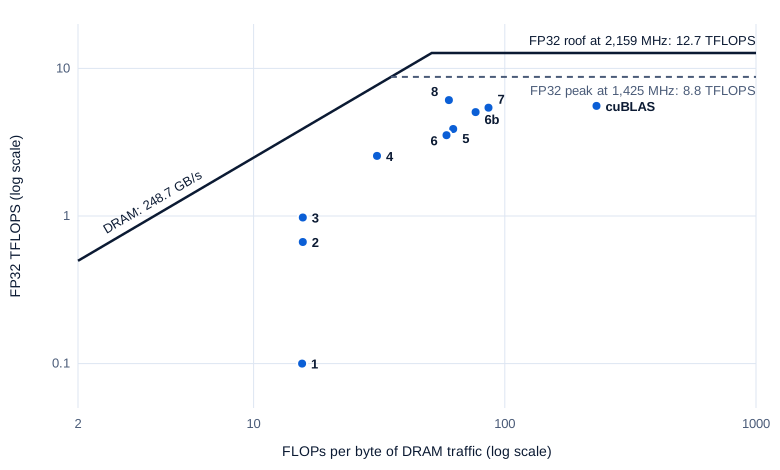
Swipe to pan the diagram, or tap it to zoom.
Kernels 1 to 3 sit at the same intensity, about 16 FLOPs per DRAM byte, yet differ tenfold in speed, so DRAM isn’t what limits them. Tiling moved the later kernels right, but even kernel 8 is far from the sloped line; its limit is instruction issue. cuBLAS sits at 232 FLOPs per byte because it reads only 0.59 GB from DRAM, against kernel 8’s 2.3 GB: its L2 hit rate was 94%, against 48% for kernel 8. Since neither is near the bandwidth roof, the extra DRAM traffic didn’t slow kernel 8 down.
Size effects
The same kernels at three sizes (GFLOPS, medians of three rounds; the last row is cuBLAS’s share of peak at its clock, with kernel 8’s in brackets):
| Kernel | n = 1,024 | n = 2,048 | n = 4,096 |
|---|---|---|---|
| 1, naive | 99 | 100 | 100 |
| 3, shared-memory tiles | 1,057 | 1,066 | 977 |
| 5, 2D register blocking | 3,712 | 4,107 | 3,885 |
| 8, double buffering | 6,554 | 6,611 | 6,105 |
| cuBLAS | 5,391 | 5,662 | 5,571 |
| cuBLAS kernel | ampere_sgemm_128x64_nn, split 7 ways along k | ampere_sgemm_64x64_nn | ampere_sgemm_64x64_nn |
| Share of peak at clock: cuBLAS (kernel 8) | 51% (58%) | 59% (67%) | 62% (70%) |
At n = 1,024, kernel 8 has only 64 blocks of 128 × 128 for 48 slots (24 SMs × 2 blocks), so the second wave runs a third full, and its share of peak drops to 58%. cuBLAS chose differently: smaller 128 × 64 tiles and a grid of 8 × 16 × 7, splitting the k loop seven ways to make 896 blocks, then summing the pieces (the split-K strategy covered below). The different order of additions is why, at this size only, cuBLAS’s results differed from the hand-written kernels (by up to 7.6 × 10⁻⁵).
In the real world
What cuBLAS and CUTLASS add
cuBLAS is a collection of kernels plus a chooser. For n = 4,096 FP32 on this GPU it launched ampere_sgemm_64x64_nn: 64-thread blocks (two warps), each owning a 64 × 64 tile, 126 registers per thread, eight blocks per SM. The name says it was written for Ampere, the previous generation. The cuBLASLt interface exposes the chooser: per the cuBLAS docs, cublasLtMatmulAlgoGetHeuristic returns the possible algorithms for a shape “in the order of increasing estimated compute time.”
NVIDIA’s open-source CUTLASS templates show what production kernels add. Its efficient GEMM guide describes the same hierarchy with one more level, a warp tile between the block and the thread, and adds:
- Software pipelining: CUTLASS “uses software pipelining to overlap memory accesses with other computation within a thread” by double buffering at two levels, shared-memory tiles (kernel 8’s trick) and register fragments.
- Threadblock rasterization, which maps “consecutively launched threadblocks to packed two-dimensional regions” of C so that they reuse the same tiles in L2. That’s how cuBLAS got its 94% L2 hit rate.
- Split-K for skinny shapes: when M and N are small and K is large, too few output tiles exist to fill the GPU, so the K loop is split across blocks and the partial results added. CUTLASS’s example splits m = 128, n = 128, k = 4,096 into 16 multiplies with k = 256; the cuBLAS docs say “some GEMM algorithms split the computation along the dimension K to increase the GPU occupancy.”
The 2017 CUTLASS blog post builds its “8-by-8 overall thread tile” from four pieces, as kernel 7 does. Simon Boehm’s worklog follows a progression much like this one on an RTX A6000, from 309 GFLOPS (1.3% of cuBLAS) to 21,779 GFLOPS (93.7%) with autotuning and warp tiling. Beating cuBLAS here covers one shape on one laptop. The library handles every shape, transpose, alignment and scaling factor; this article’s kernels handle square matrices with n a multiple of 128.
The same kernel from PyTorch
PyTorch calls the same library. With TF32 disabled (torch.backends.cuda.matmul.allow_tf32 = False, the default in PyTorch 2.11), the profiler showed torch.matmul on two FP32 matrices launching ampere_sgemm_64x64_nn at n = 2,048 and 4,096 and ampere_sgemm_128x64_nn plus a memset at 1,024, the kernels the C++ program got. At n = 4,096 it ran at 5,951 GFLOPS with the SM at 1,575 MHz (the power limit had returned to 50 W), 61.5% of the peak at that clock against 61.7% from C++.
Why LLMs use tensor cores instead
Everything above runs on the CUDA cores. LLM matmuls run in BF16 or FP8 on tensor cores, units that do a small matrix multiply per instruction. Part 4 measured cuBLAS at 24.9 BF16 TFLOPS on this laptop against 6.1 in FP32, four times more. The CUTLASS guide notes that the warp-level step “may be implemented either by TensorCores issuing mma.sync or wmma instructions, or by thread-level matrix computations issued to CUDA cores.” The block tiles, shared-memory staging and pipelining stay; the 8 × 8 outer product of FMAs becomes one tensor-core instruction. Part 6 writes that kernel.
Why decode doesn’t care
Tiling only helps when values are used more than once. A decode step at batch size 1 multiplies each weight matrix by a single vector, a GEMV: every weight is used once, so there’s nothing to tile. Part 4 measured those GEMVs at about 1 FLOP per byte, on the bandwidth roof at 88% to 99% of it. Only fewer bytes per weight, or more tokens per weight read, can make them faster.
Common misconceptions
- “Shared memory is what makes a matmul fast.” Kernel 3 was only 1.5 times faster than the coalesced kernel, because the L1 cache had already been providing the same 32-wide reuse. The big jumps came from register blocking: 2.6 times, then 1.5 times.
- “Higher occupancy is always better.” Kernel 8 and cuBLAS both ran with 16 of 48 possible warps per SM, 33%. What hurt was falling to 8 warps: kernel 6 ran 30% slower than the same code with room for 16.
- “Wider loads are always faster.” Kernel 6’s
float4loads made it slower until__launch_bounds__brought it back under 128 registers. - “cuBLAS is the fastest kernel possible.” On this laptop at n = 4,096 in FP32, a kernel of about 60 lines beat it by 10%. cuBLAS ran an Ampere kernel with a lower FMA share (83% against 89%) and fewer issue slots used.
- “More GFLOPS means a better kernel.” On a power-capped laptop, kernel 8 ran at 1,425 MHz and the naive kernel at 2,175 MHz. Compare share of peak at the clock each kernel actually ran.
Key takeaways
- A matmul’s arithmetic is fixed at 2n³; a fast kernel cuts the loads and instructions around each FMA, one level of the memory hierarchy at a time.
- Coalescing fixed the access order (16.5 sectors per load down to 2.5), shared-memory tiles cut global loads per FMA by the tile size, and register blocking cut shared-memory loads to 16 per 64 FMAs.
- Watch registers per thread: 130 instead of 128 halved the blocks per SM, and
__launch_bounds__won back 43% with one line. - The ceiling for an FP32 kernel is issue slots: share of peak ≈ issue rate × share of FMA instructions. Kernel 8 got 0.80 × 0.89 = 70%, cuBLAS 0.75 × 0.83 = 62%.
- Production GEMMs add warp tiles, deeper pipelines, L2-aware block order, split-K and per-shape heuristics, and LLMs run them on tensor cores. Decode GEMVs gain nothing from any of it.
What’s next
This kernel tops out near 6 TFLOPS because CUDA cores do one multiply-add per lane per clock. Part 6, Tensor cores, replaces the innermost loop with instructions that multiply whole tiles at once: what an MMA instruction does, WMMA and mma.sync, data layouts and swizzling, FP16, BF16 and FP8 on this GPU, and a measured tensor-core matmul against the CUDA-core one built here.
Further reading
- How to Optimize a CUDA Matmul Kernel for cuBLAS-like Performance: a Worklog (Simon Boehm, 2022): the same progression on an RTX A6000, through autotuning and warp tiling, with code.
- Efficient GEMM in CUDA (NVIDIA CUTLASS docs): the block, warp and thread hierarchy, software pipelining, rasterization, split-K and sliced-K.
- CUTLASS: Fast Linear Algebra in CUDA C++ (Kerr, Merrill, Demouth and Tran, NVIDIA, 2017): the outer-product formulation and the thread tile, with figures.
- cuBLAS documentation (NVIDIA):
cublasSgemm, column-major layout, math modes, split-K behavior and cuBLASLt heuristics. - CUDA Programming Guide: C++ language extensions (NVIDIA):
__launch_bounds__and how it sets the register limit. - Nsight Compute Kernel Profiling Guide (NVIDIA): issue slots, warp stall reasons, sectors and wavefronts.
- NVIDIA Ada GPU Architecture whitepaper (NVIDIA): the SM partition with its scheduler, dispatch unit and 32 FP32 lanes.