
LLM Inference & Optimization · Part 4 of 14
Continuous Batching and Chunked Prefill: Keeping the GPU Full
How LLM servers batch requests that start and finish at different times, and how chunked prefill stops one long prompt from freezing everyone's stream.
On this page
TL;DR
Batching many users into each decode step is how a GPU earns its keep, but requests don’t arrive or finish together. Static batching runs a fixed group until its longest answer is done, so short answers leave their seats empty and new requests wait outside. Continuous batching, introduced by the Orca paper in 2022, re-forms the batch at every step: finished requests leave and waiting ones join immediately, which gave Orca 36.9 times the throughput of NVIDIA’s FasterTransformer on GPT-3 175B at the same latency. That creates a new problem: a long prompt joining the batch can freeze every other user’s stream for most of a second. Chunked prefill fixes it by feeding the prompt in slices that fit a fixed token budget per step. By the end you’ll know what vLLM’s max_num_batched_tokens and max_num_seqs control and how to pick values for them.
Why it matters
In 2022, a team from Seoul National University and FriendliAI built a serving system around one change to how it picks its batch. On GPT-3 175B, it delivered 36.9 times the throughput of NVIDIA’s optimized engine at the same latency.
The change was in when the scheduler decides. Older systems chose a batch once and ran it to the end. Orca chose again before every token.
Part 1 showed that one decode step costs about the same for 1 user or 64, because reading the weights dominates it, and Part 3 showed that batching made each token about 20 times cheaper on an H100. Both assumed a full batch at every step. Real traffic is messier: one user wants a one-line answer and the next a 2,000-word essay, and one prompt is ten tokens while the next is a 100,000-token contract. This article is about keeping the batch full anyway without making anyone’s stream stutter.
The intuition
Picture a tour bus that leaves the depot only when every seat is sold and returns only after dropping off its last passenger. A passenger whose stop is five minutes away leaves an empty seat for the rest of the three-hour loop, and the people queuing at the depot wait until the bus comes back. That’s static batching.
Continuous batching is a city bus. It stops every few milliseconds (each stop is one decode step), passengers get off at their stop, and whoever is waiting climbs into the free seats, so the bus is nearly always full and nobody waits for a whole loop.
Then a passenger arrives with a trolley of forty suitcases. If the driver waits while they load everything, everyone on board sits still. Chunked prefill loads a few bags at each stop while the bus keeps moving.
The analogy breaks in two places. A bus seat is a fixed size, but a request’s memory on the GPU, its KV cache, grows by one token every step, so a full bus can run out of room mid-route. And on a GPU, extra passengers are almost free only up to a point; past it, every extra passenger slows the whole bus.
Step 1: static batching and the empty seats
A batch is the set of requests the GPU processes together in one forward pass, the computation that runs the input through every layer of the model. With static batching, the server collects a fixed number of requests, runs prefill (reading each prompt) and then decodes (writing the answers one token per step) until every request in the batch has finished. Only then does it return results and start the next batch.
The Orca paper names the two costs. Requests that finish early keep occupying the batch, because “the engine performs computation for both ‘active’ and ‘inactive’ requests throughout all iterations.” And a request that arrives mid-batch must “wait until all requests in the current batch have finished.”
A worked timeline
Take a GPU with 4 batch slots and 8 queued requests, A to H, each wanting a different number of output tokens. Count only decode steps and assume each takes the same time.
lengths = {"A": 30, "B": 120, "C": 45, "D": 200,
           "E": 60, "F": 15, "G": 90, "H": 150}
slots = 4

# Static batching: [A, B, C, D], then [E, F, G, H]
steps_1 = max(30, 120, 45, 200)        # 200 steps
steps_2 = max(60, 15, 90, 150)         # 150 steps
useful  = sum(lengths.values())        # 710 tokens actually wanted
total   = slots * (steps_1 + steps_2)  # 4 slots x 350 steps = 1,400 slot-steps
print(useful / total) # 0.507: about half the slots are wasted| Batch | Requests (output tokens) | Steps the batch runs | Useful slot-steps | Utilization |
|---|---|---|---|---|
| 1 | A 30, B 120, C 45, D 200 | 200 | 395 of 800 | 49.4% |
| 2 | E 60, F 15, G 90, H 150 | 150 | 315 of 600 | 52.5% |
| Total | 8 requests | 350 | 710 of 1,400 | 50.7% |
Half of the slot-steps go to requests that are already done. A finished its 30 tokens at step 30 but its user gets nothing back until step 200, and F, which needs only 15 tokens, doesn’t even start until step 200. The average request completes at step 275.
The waste grows with how much output lengths vary. If every request wanted exactly 100 tokens, static batching would waste nothing, but chat answers range from one word to thousands of tokens.
Dynamic batching helps arrival, not departure
Dynamic batching came first. NVIDIA’s Triton Inference Server describes its dynamic batcher as one that “allows inference requests to be combined by the server, so that a batch is created dynamically.” The server waits a short, configurable time (max_queue_delay_microseconds) for more requests to arrive, then launches whatever it has. The server’s docs frame it plainly as a way to “trade off increased latency for increased throughput.”
That suits models that answer in one forward pass, such as image classifiers or embedding models. For an LLM it only fixes how batches start: once launched, a dynamic batch still runs until its longest request finishes.
Step 2: continuous batching, one decision per step
Orca’s fix is iteration-level scheduling: schedule “at the granularity of iteration (instead of request).” An iteration is one forward pass of the model, so one decode step. In the paper’s words, the scheduler repeats three things: “(1) selects requests to run next; (2) invokes the engine to execute one iteration for the selected requests; and (3) receives execution results for the scheduled iteration.” Because control comes back every step, a finished request returns to its user right away, and a new request can start at the very next step. This is now usually called continuous batching. NVIDIA’s TensorRT-LLM calls it in-flight batching, “also known as continuous batching or iteration-level batching.”
Run the same 8 requests with continuous batching. When A finishes at step 30, E takes its slot at step 31. When C finishes at step 45, F joins, and so on:
| Request | Output tokens | Finishes, static (step) | Finishes, continuous (step) |
|---|---|---|---|
| A | 30 | 200 | 30 |
| C | 45 | 200 | 45 |
| F | 15 | 350 | 60 |
| E | 60 | 350 | 90 |
| B | 120 | 200 | 120 |
| G | 90 | 350 | 150 |
| D | 200 | 200 | 200 |
| H | 150 | 350 | 240 |
All 8 requests finish in 240 steps instead of 350, and the average request completes at step 117 instead of 275, less than half the wait. At Part 1’s 4.8 ms per step for Llama 3.1 8B on an H100, that’s 1.15 s instead of 1.68 s for the whole set. Utilization rises from 51% to 74%. The remaining gap is the tail: after step 150 the queue is empty, so H and D run in a half-empty batch. On a busy server the queue rarely runs dry.
Selective batching: what makes mixed batches possible
A continuous batch mixes requests at different points: one is reading a 2-token prompt, another a 3-token prompt, a third is on its 80th decode step. Their tensors have different shapes, and a classic batched operation needs a rectangular block of data.
Orca’s second idea, selective batching, “applies batching only to a selected set of operations.” Most of a Transformer’s work (the linear layers, layer norm, the activation function) treats every token independently, so the scheduler flattens all tokens from all requests into one long list and runs them through those layers together. Attention is the exception, because each token must only see the keys and values of its own request. For attention, Orca splits the batch and “processes each request individually,” then merges the results back. The expensive part, multiplying by the weight matrices, is still batched across everyone. Today’s engines follow the same principle.
The scheduler loop
Here is what one step looks like in a current engine such as vLLM:
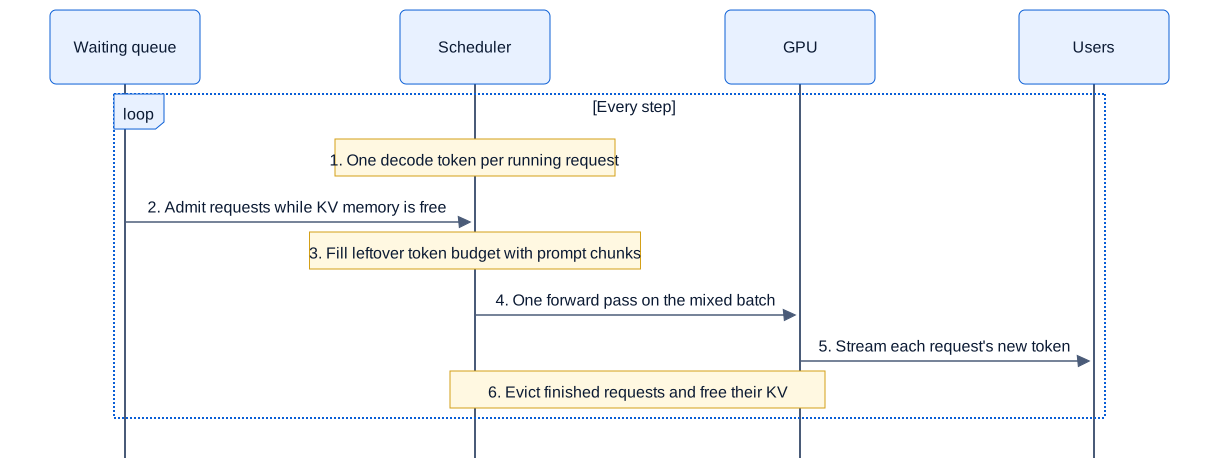
Swipe to pan the diagram, or tap it to zoom.
The batch is rebuilt every few milliseconds, and requests that are already running are served first. In plain steps:
- Decode first: every request that is already generating gets one token in this step.
- Admit: if there’s room, take requests from the waiting queue, in arrival order by default.
- Prefill: spend what’s left of this step’s token budget on prompt tokens for newly admitted requests.
- Run one forward pass on the whole mixed batch.
- Stream and evict: send each request its new token. Requests that produced an end token or hit their length limit leave, and their memory is freed for the next step.
Memory decides who gets in
“If there’s room” means room in the KV cache, the per-request store of attention keys and values that Part 2 sized. For Llama 3.1 8B, every token of every running request holds 128 KiB, and Part 1 worked out that an 80 GB H100 has room for about 488,000 tokens of cache after the weights.
The catch is that a request’s final length is unknown when it’s admitted. Orca handled that by reserving the worst case: the scheduler “uses the request’s max_tokens attribute to reserve max_tokens slots of GPU memory” up front, which guarantees a request never runs out mid-answer. The cost is idle memory:
KV budget                         = 488,000 tokens
reserve 4,096 tokens per request  → 488,000 ÷ 4,096 = 119 requests
actually use 1,500 on average     → 488,000 ÷ 1,500 = 325 requests could fit
Reserving the worst case leaves almost two thirds of the cache empty. The alternative is to allocate memory as tokens are generated and deal with the rare moment when it runs out. vLLM does this: when a running request can’t get memory for its next token, the scheduler preempts another request, under its default first-come-first-served policy the most recently admitted one, frees its cache, and puts it back in the queue. In vLLM V1, the default preemption mode is RECOMPUTE: the preempted request’s cache is rebuilt by prefill when there’s space again. How vLLM allocates the cache in small blocks to make that work is Part 5.
Step 3: when a long prompt joins the batch
Continuous batching admits new requests at every step, and every new request starts with a prefill, which is a very different amount of work from decode. A decode step processes one token per user. A prefill processes the whole prompt at once. Early continuous-batching engines handled them in one of two ways, and the Sarathi-Serve paper shows both hurt. vLLM’s original scheduler ran prefills by themselves, “scheduling as many prefills as possible before resuming ongoing decodes.” Orca put a whole prompt into the same step as the decodes, which makes that step as slow as the prompt. Either way, everyone decoding waits for the prompt.
Sarathi-Serve calls this a generation stall and reports that “a generation stall in vLLM can last over several seconds.” The DistServe paper describes the same effect from the other side: “adding a single prefill job to a batch of decoding requests significantly slows down both processes.”
A worked stall on an H100
Use Part 1’s numbers: Llama 3.1 8B in 16-bit on an H100, 989 trillion floating-point operations (FLOPs) per second at peak and 3.35 TB/s of memory bandwidth. Sixty-four users are mid-conversation at 4,096 tokens of context each. Part 1 worked out their decode step:
memory per step = 16.06 GB weights + 64 × 4,096 × 128 KiB of KV cache ≈ 50.4 GB
step time       ≈ 50.4 GB ÷ 3.35 TB/s ≈ 15 ms
So each user sees a new token every 15 ms, about 66 tokens per second. Now a user pastes a 32,768-token document. Its prefill costs:
linear layers = 2 × 8.03 billion × 32,768 tokens   ≈ 526 TFLOPs → 0.53 s at peak
attention     ≈ 2 × 32 layers × 32,768² × 4,096    ≈ 281 TFLOPs → 0.28 s at peak
total                                              ≈ 0.82 s
The attention line counts, in each of 32 layers, every pair of a prompt token and an earlier token: two multiply-adds (score and value) across 4,096 query dimensions, at 2 FLOPs each, with the causal mask halving the pairs.
For those 0.82 seconds, all 64 streams freeze. Each user’s gap between tokens jumps from 15 ms to about 835 ms, 54 times longer. And 0.82 s is the best case at peak arithmetic; real kernels run below peak, so the stall is longer. If long prompts arrive every few seconds, the 99th-percentile TPOT (time per output token) is set by other people’s prompts. Holding the prompt back isn’t an answer either, because its user is waiting too and their TTFT (time to first token) keeps growing.
Step 4: chunked prefill and the token budget
Look again at the decode step. It moves 50.4 GB in 15 ms, but its math, 64 tokens through the model, takes about 1 ms, so the tensor cores sit idle for the other 14 ms. How much prefill would fit in that time?
idle compute ≈ 15 ms × 989 TFLOPs/s ÷ (2 × 8.03 billion FLOPs per token) ≈ 927 tokensAbout 900 prompt tokens can ride along in each decode step at almost no extra time, because the step is waiting on memory anyway. Chunked prefill, introduced in SARATHI in 2023, splits a long prompt into equal-sized chunks and adds one chunk to each decode step, which SARATHI called “piggybacking decodes with chunked prefills.”
Its successor, Sarathi-Serve, turned this into a scheduling rule called stall-free batching. Each step has a token budget, the maximum number of tokens processed in one forward pass. The scheduler first packs in every running decode, then any partially finished prefill, and only then admits new requests, cutting each prompt down to whatever fits the leftover budget. In the paper’s words, by “restricting the computational load in every iteration, stall-free batching ensures that decodes never experience a generation stall due to a co-running prefill chunk.”
Choosing the budget
Run the same 32,768-token prompt through the same 64-user batch with different budgets. Each step processes 64 decode tokens plus a prompt chunk of budget − 64 tokens. Step time is the larger of the memory time (15 ms) and the math time, counting linear layers only and assuming the two overlap perfectly, the same roofline model Part 1 used:
| Token budget per step | Prompt tokens per step | Step time (everyone’s gap between tokens) | Steps to finish the prompt | Prompt’s prefill time |
|---|---|---|---|---|
| No chunking | 32,768 | 0.53 s stall, then 15 ms | 1 | 0.53 s |
| 512 | 448 | 15.1 ms | 74 | 1.11 s |
| 1,024 | 960 | 16.6 ms | 35 | 0.58 s |
| 2,048 | 1,984 | 33.3 ms | 17 | 0.57 s |
| 8,192 | 8,128 | 133 ms | 5 | 0.67 s |
The budget trades one user’s wait against everyone else’s. Small budgets protect the 64 people already streaming but stretch the newcomer’s TTFT: at 512 tokens, nobody’s stream slows, but the long prompt takes twice as long to read. Big budgets finish the prompt quickly but make every step slower. Around 1,000 tokens, close to the 927 tokens of idle compute, both sides barely notice: decodes slow from 15 to 16.6 ms, and the prompt finishes in 0.58 s instead of 0.53 s.
That balance point depends on the model, the GPU and how many users are decoding, which is why Sarathi-Serve picks the budget by profiling against a latency target. In its experiments the budget was 512 for strict targets and 2,048 for relaxed ones.
Chunking isn’t free. Each chunk’s attention has to read the keys and values of all earlier chunks again, which “results in increased memory reads from the GPU HBM even though the computational cost is unchanged.” On Yi-34B, Sarathi-Serve measured an overhead of at most about 25% on prefill time with 512-token chunks and almost none at 2,048.
Throughput, latency and goodput
The number of running requests is the other half of the tradeoff. Here is Llama 3.1 8B decoding on an H100 with every user at 2,048 tokens of context, using Part 1’s model (weights plus KV cache read every step):
| Running requests | KV cache in use | Step time (TPOT) | Total tokens per second |
|---|---|---|---|
| 1 | 0.3 GB | 4.9 ms | 205 |
| 8 | 2.1 GB | 5.4 ms | 1,472 |
| 32 | 8.6 GB | 7.4 ms | 4,349 |
| 64 | 17.2 GB | 9.9 ms | 6,450 |
| 128 | 34.4 GB | 15.1 ms | 8,505 |
| 192 | 51.5 GB | 20.2 ms | 9,515 |
| 238 (KV memory full) | 63.9 GB | 23.9 ms | 9,973 |
Throughput keeps rising with the batch, but each step gets longer, because every extra user adds KV cache to read. Going from 64 to 238 users gives 55% more tokens per second and makes every user’s stream 2.4 times slower.
Which row is right depends on the latency target, and goodput measures exactly that. DistServe defines it as “the maximum request rate that can be served adhering to the SLO attainment goal (say, 90%) for each GPU provisioned.” An SLO (service-level objective) here is a target such as “TPOT under 20 ms.” With a 20 ms target, this GPU can run about 189 users and produce about 9,480 tokens per second. With a 10 ms target, it can run only 64 users and 6,450 tokens per second. Throughput beyond the target doesn’t count.
Continuous batching keeps the batch near whichever row you choose instead of swinging between full and half empty. Chunked prefill keeps long prompts from pushing individual steps far above it.
In the real world
The original results
Orca’s evaluation ran GPT-3 175B against FasterTransformer, which batched per request. At a median normalized latency of 190 ms per token, FasterTransformer served 0.185 requests per second and Orca 6.81: the 36.9 times in the abstract. That point sits where the baseline was already struggling, so read it as a best case. The paper’s broader claim, for its multi-GPU configurations, is an order of magnitude more throughput at similar latency.
Anyscale’s 2023 benchmark is easier to relate to. On OPT-13B and one 40 GB A100, against static batching with Hugging Face’s pipelines:
| System | Batching | Throughput vs naive static batching |
|---|---|---|
| NVIDIA FasterTransformer | Static, with an optimized model | 4× |
| Hugging Face text-generation-inference, Ray Serve | Continuous | 8× |
| vLLM | Continuous, plus PagedAttention memory management | up to 23× |
The same post reports lower median latency with continuous batching. vLLM’s lead over the other continuous-batching systems came from memory management: the more requests fit in the KV cache, the bigger the batch can grow.
Chunked prefill in numbers
SARATHI reported, for LLaMA-13B on an A6000 GPU, decode throughput up to 10 times higher and end-to-end throughput up to 1.33 times higher. Sarathi-Serve measured serving capacity, the highest request rate a system sustains within its latency targets, against vLLM: 2.6 times higher for Mistral-7B on one A100, up to 3.7 times for Yi-34B on two A100s, and up to 5.6 times for Falcon-180B with pipeline parallelism. Mixing whole prefills into decode batches, by contrast, increased the time between tokens by up to 28.3 times compared with a decode-only batch.
What vLLM exposes
vLLM’s V1 engine, released in January 2025, “removes the traditional distinction between ‘prefill’ and ‘decode’ phases”: each scheduling decision is a map of {request_id: num_tokens} for the step. The optimization guide says that “In V1, chunked prefill is enabled by default whenever possible,” and that the scheduler “prioritizes decode requests,” scheduling prefills only when there’s budget left. The knobs:
| Setting | What it controls | Default for vllm serve on an H100 |
|---|---|---|
max_num_batched_tokens | The token budget: “Maximum number of tokens that can be processed in a single iteration” | 8,192 |
max_num_seqs | The most requests in one step | 1,024 |
enable_chunked_prefill | Whether prompts can be cut to fit the remaining budget | On, where the model supports it |
long_prefill_token_threshold | Prompts longer than this count as long and get capped per step | 0 (no cap) |
The defaults come from the vLLM source as of October 2026 and depend on the GPU: 16,384 tokens on a B200, 2,048 tokens and 256 sequences on an A100. The docs give the tradeoff directly: “Smaller values (e.g., 2048) achieve better ITL because there are fewer prefills slowing down decodes,” where ITL (inter-token latency) is another name for TPOT. Higher values give better TTFT, and for raw throughput they recommend “max_num_batched_tokens > 8192 especially for smaller models on large GPUs.”
If you see preemption warnings, the same guide suggests lowering max_num_seqs or max_num_batched_tokens so fewer requests compete for cache. TensorRT-LLM has equivalent settings, max_batch_size and max_num_tokens, and also supports chunked context. The System Design posts on reducing time to first token and serving open LLMs at scale show where these settings sit in a full deployment.
Where chunking stops helping
Chunked prefill makes two kinds of work share one GPU fairly, but they still compete for it. DistServe argues that the two phases need different resources and parallelism, so the best goodput comes from running them on separate GPUs. That’s disaggregated serving, Part 12.
Common misconceptions
- “Batching makes each user slower.” Continuous batching cut the average completion time in the example above from step 275 to step 117, and Anyscale measured lower median latency with it.
- “Continuous batching means the batch is always the same size.” It means the batch is rebuilt every step. Its size moves with traffic and is capped by
max_num_seqs, the token budget and free KV cache memory. - “A bigger batch is always better.” Throughput rises with batch size, but so does every user’s TPOT. Past your latency target, extra throughput doesn’t count toward goodput.
- “Chunked prefill makes prefill faster.” It makes it fairer. The prompt’s own prefill takes about as long or a little longer, since each chunk re-reads the earlier chunks’ cache. What it removes is the stall everyone else would feel.
- “Prefill and decode can’t share a step.” They usually do. A decode step leaves the tensor cores mostly idle, and a prompt chunk fills that idle time.
Key takeaways
- Static batching holds a batch until its longest request finishes. With realistic output lengths, about half the batch slots go to requests that are already done, and new arrivals wait the whole time.
- Continuous batching, from the Orca paper, makes a scheduling decision at every step. Finished requests leave at once and waiting requests take their places, which gave Orca 36.9 times the throughput of FasterTransformer on GPT-3 175B at the same latency.
- How many requests can run is set by KV cache memory. Reserving each request’s maximum length up front leaves most of that memory idle, so engines allocate as they go and pause requests when memory runs out.
- A long prompt run as one prefill freezes every other stream: about 0.8 seconds for a 32,768-token prompt on an H100 with an 8 billion-parameter model.
- Chunked prefill gives each step a fixed token budget, serves decodes first, and fills the rest with slices of prompts. Around a thousand tokens per step, the prompt finishes nearly as fast and nobody’s stream stutters.
What’s next
Continuous batching only works if new requests can find memory for their KV cache, and early servers wasted most of it on reservations and fragmentation. Part 5 covers PagedAttention and vLLM: how storing the cache in small fixed-size blocks, like an operating system’s memory pages, raised throughput two to four times on the same GPUs.
Further reading
- Orca: A Distributed Serving System for Transformer-Based Generative Models (Yu et al., OSDI 2022): iteration-level scheduling and selective batching, the origin of continuous batching.
- SARATHI: Efficient LLM Inference by Piggybacking Decodes with Chunked Prefills (Agrawal et al., 2023): the first paper on chunked prefill and decode-maximal batching.
- Taming Throughput-Latency Tradeoff in LLM Inference with Sarathi-Serve (Agrawal et al., 2024): stall-free batching, token budgets and generation stalls.
- DistServe: Disaggregating Prefill and Decoding for Goodput-optimized Large Language Model Serving (Zhong et al., 2024): the goodput definition and the case for separating the two phases.
- vLLM: Optimization and Tuning and Engine Arguments: chunked prefill, the token budget and preemption, as shipped.
- vLLM V1: A Major Upgrade to vLLM’s Core Architecture (vLLM team, 2025): the unified prefill and decode scheduler.
- TensorRT-LLM: Paged Attention, IFB, and Request Scheduling (NVIDIA): in-flight batching and chunked context in NVIDIA’s engine.
- How continuous batching enables 23x throughput in LLM inference while reducing p50 latency (Daniel et al., Anyscale, 2023): the clearest benchmark-driven explanation of static versus continuous batching.
- Triton Inference Server: Dynamic Batcher (NVIDIA): how request-level dynamic batching works and what it trades.